


It’s the moment many of us in the Aotearoa tech scene have been waiting for: the AWS New Zealand Region is officially live! After much anticipation, the data centers are humming, the services are online, and the new region, ap-southeast-6, is ready for action.
This is fantastic news for Kiwi businesses, developers, and the entire digital economy. But once the initial excitement settles, the big question is: what now? How do you actually take advantage of this new digital real estate in our own backyard?
What This Means for Kiwi Businesses
The launch of a local AWS region is more than just a new option in a dropdown menu. It’s a game-changer for several key reasons
Lower Latency, Happier Users: This is the most immediate and tangible benefit. Hosting applications closer to your end-users in New Zealand means data doesn’t have to travel across the Tasman Sea or the Pacific Ocean. For everything from websites and mobile apps to online gaming and streaming services, this reduction in delay (latency) results in a faster, more responsive experience for your customers. Think snappier page loads and smoother interactions.
Data Sovereignty Solved: For many organizations, especially in government, healthcare, and finance, the ability to keep data within New Zealand’s borders is a strict regulatory requirement. The ap-southeast-6 region solves this data residency puzzle. Previously, even if you could run primary workloads in Australian regions, some compliance rules still required a backup copy of your data to be stored physically in New Zealand. This often forced organizations into complex and costly solutions, like shipping backups to local third-party data centers. Now, this compliance can be achieved easily and natively within AWS. You can simply use native AWS services to automatically store a secure copy of your data in the Auckland region, ticking the box for in-country backups without the operational headache.
Boosting Local Innovation: Having world-class infrastructure on our doorstep empowers local startups and established companies alike. It lowers the barrier to entry for building sophisticated, high-performance applications and services that can compete on a global scale, all while being developed and managed right here at home.
A Greener Cloud: Sustainability in the NZ Region
Beyond performance and compliance, choosing the Auckland region has another powerful benefit: sustainability. For Kiwi businesses committed to their environmental goals and the principle of kaitiakitanga (guardianship), this is a significant advantage.
AWS is committed to powering its operations with 100% renewable energy by 2025 and reaching net-zero carbon across its business by 2040. By launching in New Zealand, they plug directly into one of the greenest energy grids in the world, with over 80% of our electricity generated from renewable sources like hydro, geothermal, and wind power.
Running your workloads on AWS is also inherently more efficient. Due to their scale, custom-built hardware, and operational excellence, AWS data centers can be up to five times more energy-efficient than a typical European enterprise data center. This means you can significantly reduce your application’s carbon footprint compared to running it in an on-premises facility.
To help you measure this impact, you can use the AWS Customer Carbon Footprint Tool in the billing console to track the emissions associated with your usage and support your own sustainability reporting.
Quick Latency Comparison: NZ vs. Sydney
Talk is cheap, so let’s look at the numbers. How much faster is it really?
I ran a quick test from my local laptop here in New Zealand, making a simple web request to two identical NGINX servers: one running on an EC2 instance in the new Auckland region (ap-southeast-6), and another in the Sydney region (ap-southeast-2).
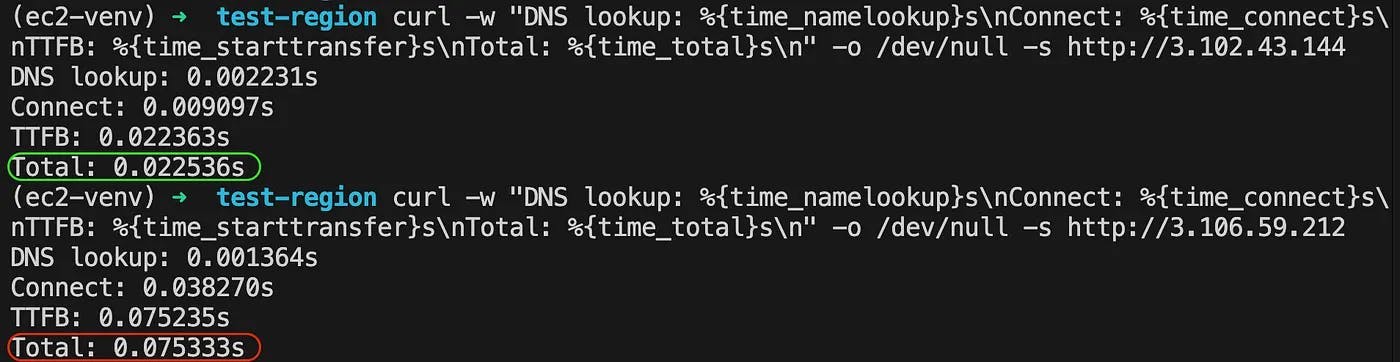
The results speak for themselves.
Connecting to the Auckland : The total time was ~22.5 milliseconds.
Connecting to the Sydney : The total time was ~75.3 milliseconds.
It’s worth noting this test was performed over a standard WiFi connection to better represent a typical user’s experience. While the exact milliseconds will vary depending on your own connection, the key takeaway is the relative difference: accessing the local region is roughly three times faster. This is a performance boost that your customers will absolutely feel.
For applications that require real-time communication or fast data retrieval, this reduction is not just a nice-to-have; it’s a fundamental improvement that directly enhances the user experience.
Getting Started: Practical First Steps
Ready to dive in? Moving into a new AWS region isn’t a single click, but it doesn’t have to be a headache. Here’s a practical checklist to get you started.
1. Check Service Availability
Not all AWS services are available in every region on day one. Before you make any plans, check the AWS Regional Services List to confirm that the services you rely on — like certain EC2 instance types, specific database engines on RDS, or advanced AI/ML services — are available in ap-southeast-6.
2. Update Your Infrastructure as Code (IaC)
If you’re using tools like Terraform or the AWS CDK, leveraging the new region is straightforward. This is a great time to review your code and templatize the region setting if you haven’t already.
Terraform
For example, in Terraform, your provider block would be updated to:
provider "aws" {
  region = "ap-southeast-6"
}

# ... your resource definitions follow
resource "aws_instance" "web_server" {
  ami           = "ami-0123456789abcdef0" # Use a valid AMI for ap-southeast-6
  instance_type = "t3.micro"

  tags = {
    Name = "MyWebServer-NZ"
  }
}
AWS CDK (Cloud Development Kit)
For those using the AWS CDK, before you can deploy your stacks, you first need to bootstrap the new region. Bootstrapping creates the necessary resources (like an S3 bucket for your packaged code and assets) that the CDK needs to operate.
Run the following command in your terminal, replacing ACCOUNT-ID with your actual AWS Account ID:
cdk bootstrap aws://ACCOUNT-ID/ap-southeast-6Once bootstrapping is complete, you can deploy your CDK stacks to the New Zealand region by specifying it in your CDK app or via the command line.
3. Plan Your Migration or Deployment Strategy
You have a few options for how to use the new region:
New Deployments: The easiest approach. All new projects and environments can be deployed directly into
ap-southeast-6from the get-go.Lift and Shift: For existing applications, you can create snapshots of your EC2 instances and RDS databases, copy them to the new region, and relaunch them. This is a straightforward path for simpler workloads.
Hybrid Approach: You might choose to keep some services running in another region (like Sydney) while moving latency-sensitive components to the New Zealand region.
Disaster Recovery (DR): The NZ region is a perfect candidate for a DR site. You can now replicate your data and infrastructure from another region (e.g.,
ap-southeast-2in Sydney) toap-southeast-6for enhanced resilience.
Beyond the Hype: Strategic Considerations
The real power of the local region isn’t just in moving existing workloads — it’s in enabling new possibilities. This is a great opportunity to ask some strategic questions:
Could we now build that real-time application we always wanted to?
How can we use the local region to improve our disaster recovery posture and business continuity?
Can we architect a multi-region setup that gives our users in both Australia and New Zealand the best possible performance?
The launch of the AWS ap-southeast-6 region marks a new chapter for technology in New Zealand. It’s time to move past the announcement and start building. So, log into your console, select the new region, and start creating the future. The tools are right here on our shores.