


Introduction
In March 2026, kubernetes/ingress-nginx reaches end-of-life due to security debt and maintainer gap. If you're running it in production, you need a plan. This post covers our migration to AWS Load Balancer Controller with Gateway API on Amazon EKS — what we hit, what worked, and lessons learned.
Part 1: Key Terminology
Before anything else — these names cause real confusion (reference):
Ingress API
ingress-nginx
NGINX Ingress Controller
Repo
Owner
Kubernetes (SIG Network)
Kubernetes community (volunteers)
F5 / NGINX Inc.
Analogy
The menu
The chef — reads the menu and cooks
A different restaurant, same sign
What it does
Declares routing rules — kind: Ingress is just a config object
Watches Ingress objects, writes nginx.conf, reloads NGINX
Same concept, separate codebase, still maintained
Status
Feature-frozen
Going EOL March 2026
Actively maintained
How all three work together — config path (top) vs. traffic path (bottom):
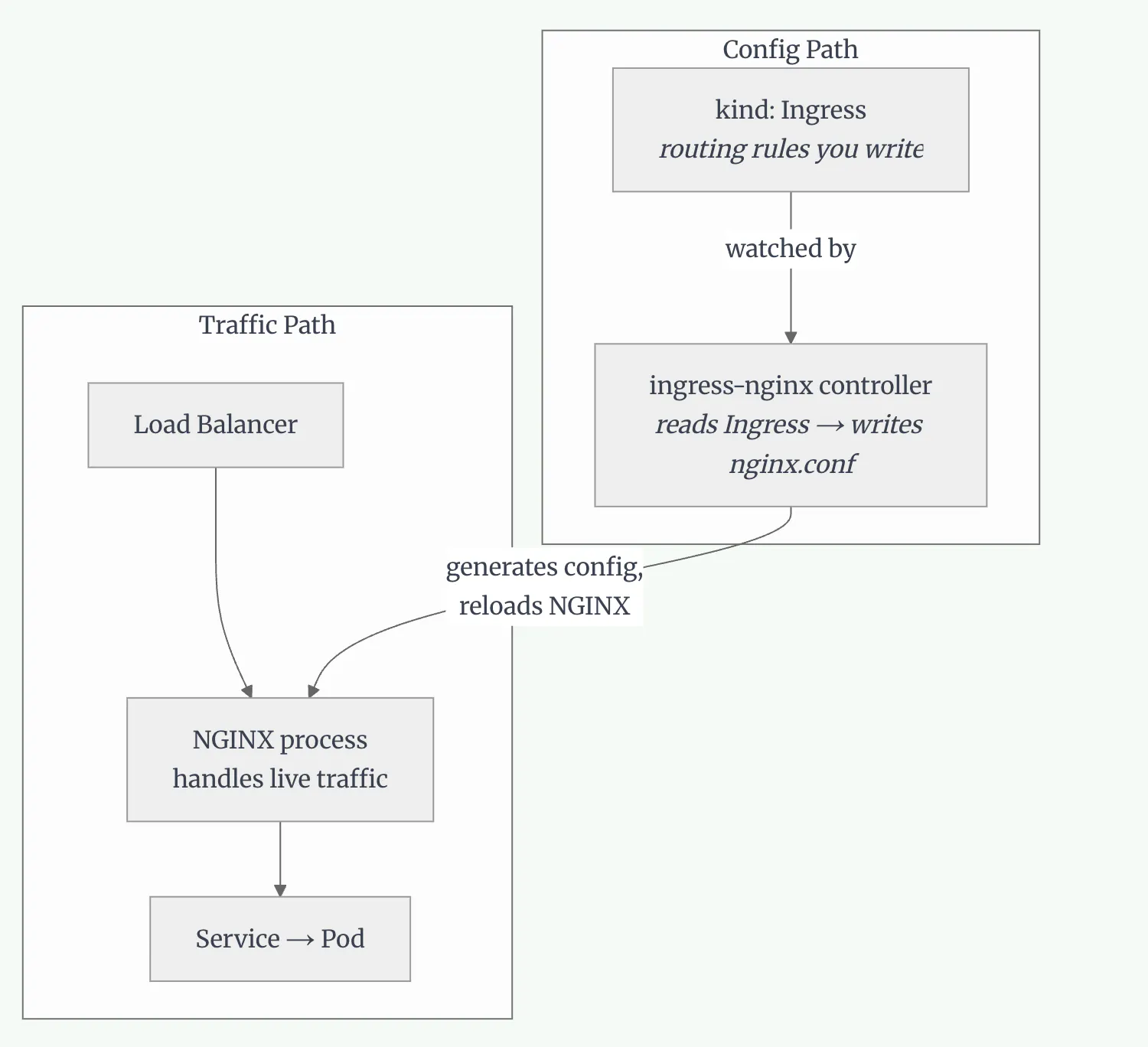
The Ingress API is the spec. ingress-nginx is what reads it and makes traffic work. Without the controller, the Ingress object does nothing.
Part 2: How ingress-nginx Works
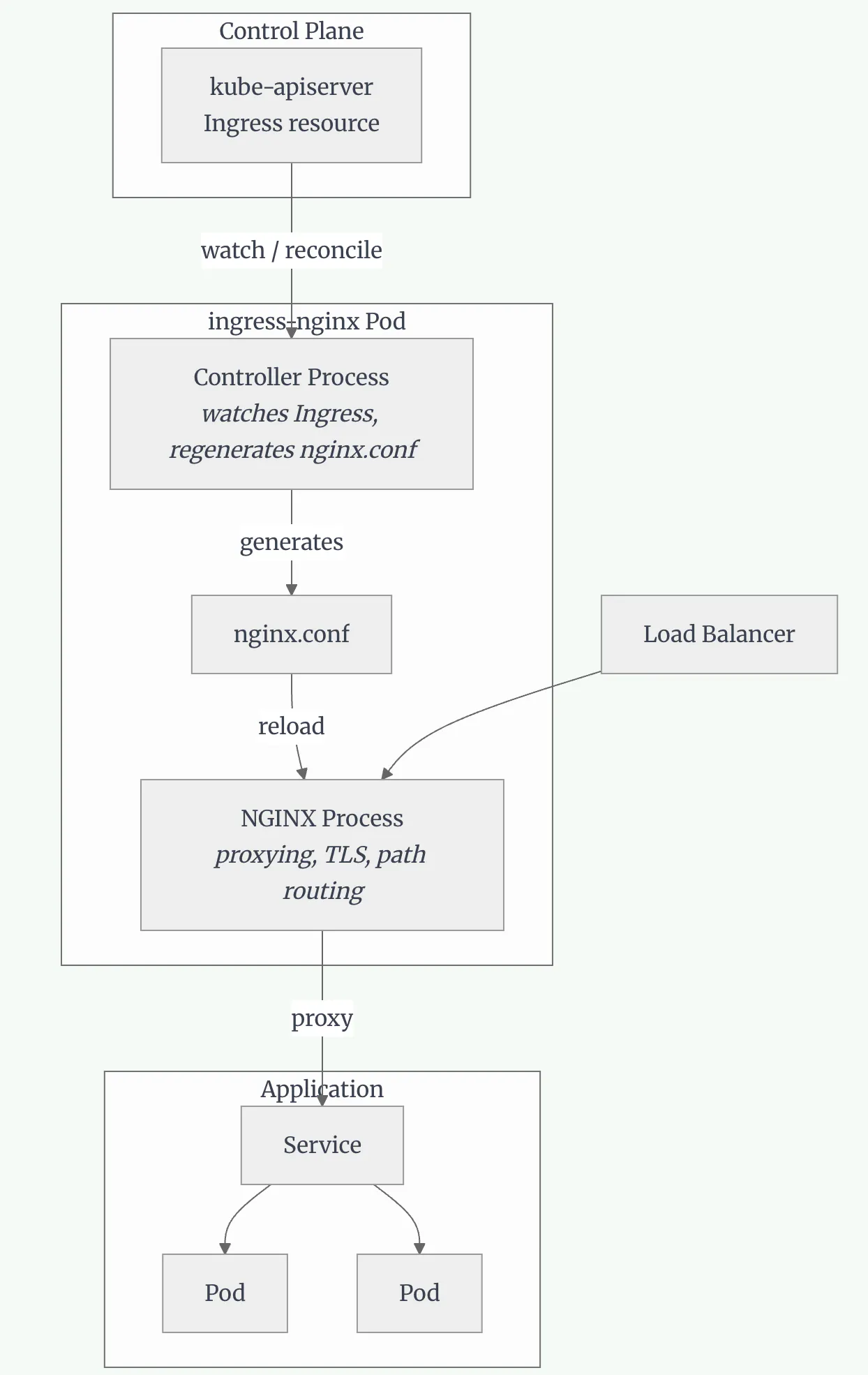
Inside a single pod, two processes handle everything — the controller reconciles config, NGINX serves traffic:
Part 3: Evaluating Migration Options
When ingress-nginx EOL was announced, we evaluated three options:
Option
Pros
Cons
Decision
NGINX Gateway Fabric
Same NGINX proxy, familiar patterns
Vendor extensions, still manage NGINX
Overkill
AWS Load Balancer Controller
Native AWS, no proxy layer
AWS-specific
✅ Our choice
Istio / Traefik / Envoy
Various benefits
Too heavy or too new
Not suitable
Why We Chose AWS Load Balancer Controller
Three factors made this an easy decision for us:
No advanced NGINX usage — we weren't using custom snippets
All-AWS infrastructure — EKS, ALB — native integration was a feature, not a constraint
Strong community — active development, extensive documentation, large EKS adoption
If you rely heavily on NGINX-specific features, NGINX Gateway Fabric might be the right choice. For a vanilla AWS shop, AWS LBC with Gateway API is the cleaner path.
Part 4: Understanding Gateway API
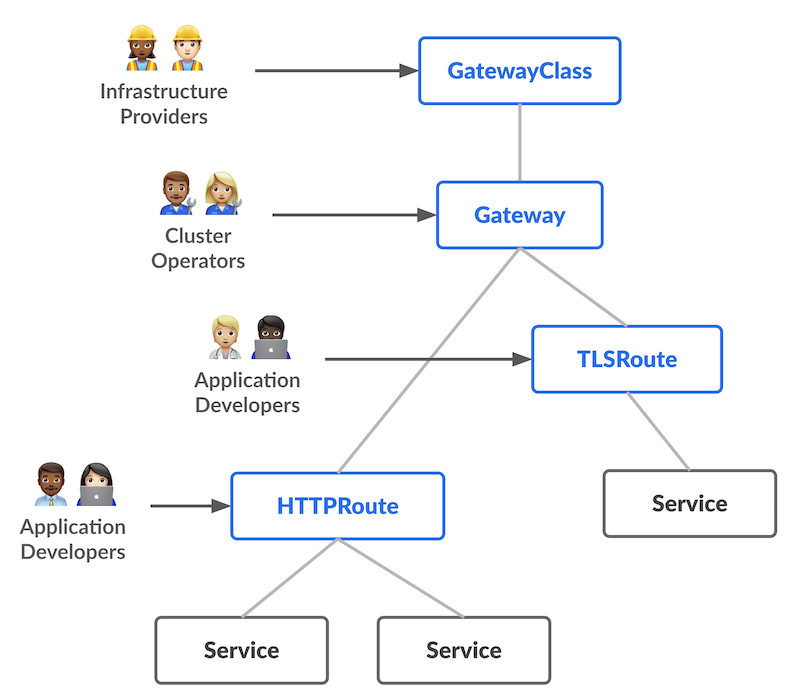
Gateway API is the next generation of Kubernetes Ingress — an official Kubernetes project focused on L4 and L7 routing. Unlike Ingress (a single resource owned by one team), Gateway API is role-oriented: each resource type maps to a different team's responsibility.
Role-Oriented Design
Each resource belongs to a different persona:
Resource
Role
Owns
GatewayClass
Infrastructure Provider / Platform team
Defines which controller handles traffic (e.g. amazon-alb)
Gateway
Cluster Operator / SRE
Provisions the actual load balancer — ports, protocols, TLS
HTTPRoute
Application Developer
Defines path-based routing rules per app
Analogy: Think of it like a building. GatewayClass is the building type (office, residential). Gateway is a specific floor with an entrance. HTTPRoute is the room a visitor gets directed to.
The key insight that confused me initially: one Gateway (one ALB) can serve many HTTPRoutes (many applications). You don't create a new load balancer per app — you create a new route that attaches to the existing Gateway.
Part 5: The Challenges
Challenge 1: Enabling Gateway API on an Existing Installation
We had AWS LBC old version installed but not actively routing traffic. Gateway API L7/ALB support was added in v2.14.0 (beta) and reached GA in v3.0.0.
Enabling it requires two things:
Apply Gateway API CRDs from the Kubernetes SIG
Set enableGatewayAPI: true in the Helm values
Our solution: clean reinstall
Since our LBC wasn't handling production traffic, we chose to uninstall and reinstall cleanly rather than update CRDs and toggle flags in-place — less risk of partial state. See the installation guide for full steps.
If your LBC is actively handling production traffic, use a parallel deployment instead: install fresh in a separate namespace with Gateway API enabled, migrate services one by one, then remove the old controller only after all traffic is moved.
Challenge 2: Path Rewriting Rules
Our initial concern was whether Gateway API could handle path-based sub-path routing cleanly—NGINX made this easy with annotations, and we weren't sure the new approach would hold up. It does, just differently.
# NGINX approach — proxy strips the prefix
annotations:
  nginx.ingress.kubernetes.io/rewrite-target: /$2
  nginx.ingress.kubernetes.io/use-regex: "true"
Gateway API's philosophy is different: configure the application to be path-aware, not the gateway to rewrite paths.
# Grafana Helm values — tell Grafana its root URL
grafana:
  grafana.ini:
    server:
      root_url: https://monitoring.example.com/grafana
      serve_from_sub_path: true
With that configured, the HTTPRoute needs no filters at all — just forward the request as-is:
HTTPRoute manifests
apiVersion: gateway.networking.k8s.io/v1
kind: HTTPRoute
metadata:
  name: grafana
  namespace: system
spec:
  parentRefs:
    - name: my-gateway
      namespace: kube-system
  rules:
    - matches:
        - path:
            type: PathPrefix
            value: /grafana
      backendRefs:
        - name: grafana
          port: 8080
---
apiVersion: gateway.networking.k8s.io/v1
kind: HTTPRoute
metadata:
  name: prometheus
  namespace: system
spec:
  parentRefs:
    - name: my-gateway
      namespace: kube-system
  rules:
    - matches:
        - path:
            type: PathPrefix
            value: /prometheus

      backendRefs:
        - name: prometheus-server
          port: 9090
Challenge 3: Regex Path Matching Broken
During testing, some routes required RegularExpression path matching in HTTPRoute. The controller was silently using glob matching instead, causing validation errors like:
Condition value '/some/path/[a-z]+/subresource*' contains a character that is not valid.The root cause: the controller was sending values to the ALB API instead of regexValues for regex path conditions — so regex rules were never actually applied.
There was no workaround. My colleague filed this issue, and the fix landed in v3.1.0 very quickly. This is where an active community really matters.
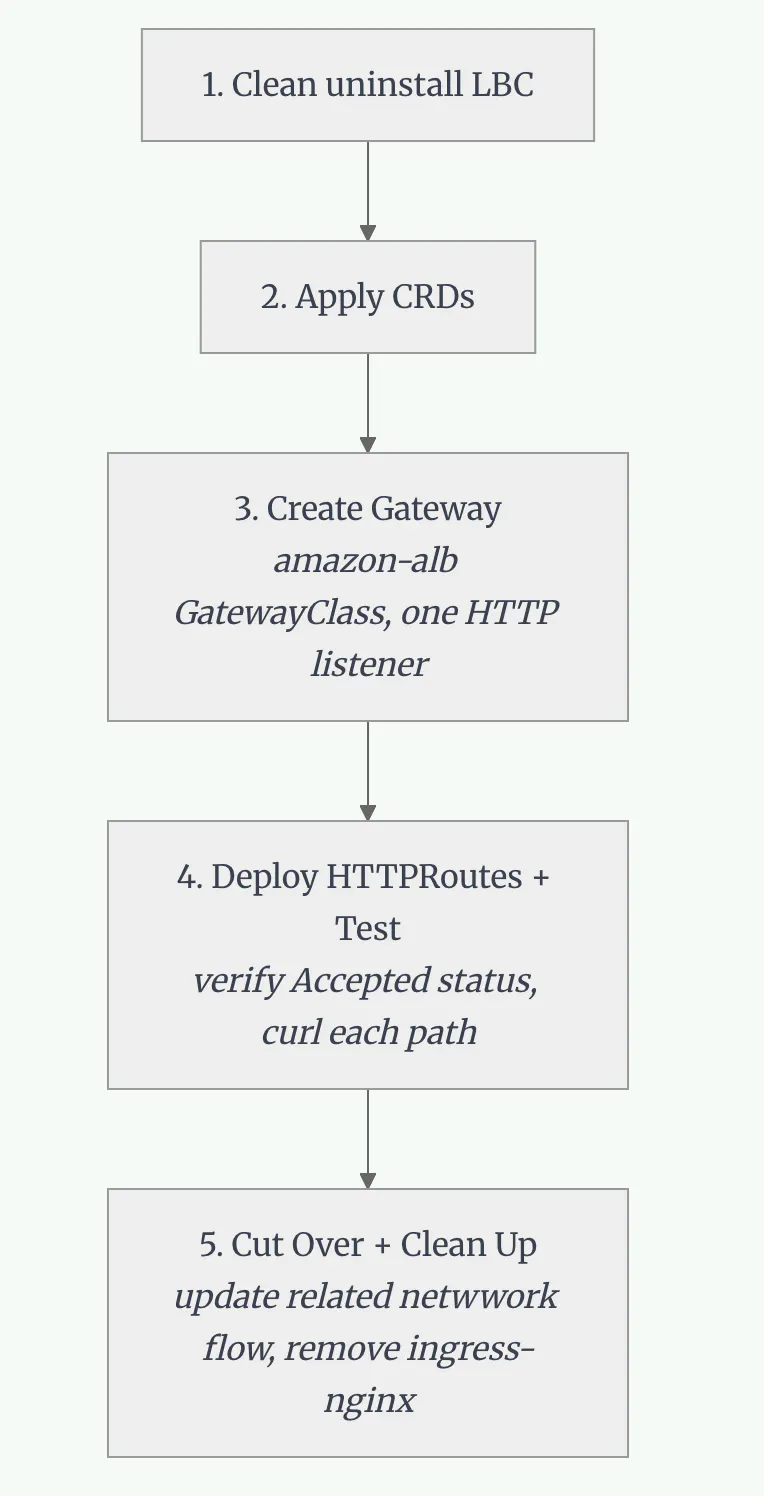
Part 6: Implementation Walkthrough
Part 7: Migration Tool
Before writing Gateway API manifests from scratch, use ingress2gateway — the official Kubernetes SIG tool that converts existing Ingress resources to Gateway API equivalents:
./ingress2gateway print --providers=ingress-nginxThis reads your existing Ingress objects and outputs equivalent Gateway and HTTPRoute YAML. Convert the output into your IaC (Helm/CDK/Terraform) and validate in a lower environment first. Useful if you have many Ingress rules and want a starting point rather than writing from scratch.
Conclusion
With Gateway API in place and a clear role hierarchy, I find it's really clean. And we also can visually see all resources, health check from AWS console, which make debug so easy.
If you're on AWS and don't have complex NGINX customizations, this migration is the right call. Just go in with eyes open and test out.
Resources: