


Recently, while working at a client, I was tasked with tackling a problem they had: they were creating isolated users for every Aurora PostgreSQL DB they spun up. They have hundreds of AWS accounts and thousands of Aurora DBs across all of them, spanning every environment, which made managing and maintaining all those database users a nightmare.
As AWS keeps extending its capabilities, the AWS Managed AD product — part of AWS Directory Service — offers a way to centralise user authentication by linking it with another AD. This article walks through some of the ins and outs of that work, focusing only on connecting Aurora PostgreSQL DBs as an endpoint service. Have a look to what gets created as part of deploying this product.
I'll refer to AWS Managed AD as "MAD" from now on. I think is appropriate after dealing with it for a year.
There are a fair few acronyms scattered through this post — mostly standard AWS and Active Directory terms. If any of them trip you up, there's a glossary at the very end.
The setup
The deployment was easy. I built a few GitHub Actions workflows to create the resources I needed: the MAD domain, its security group modifications, logging, and so on.
Because MAD is a managed service, a lot of the deployment and configuration happens on the AWS side in the backend. The first issue I hit was that only one security group can be attached to the MAD ENIs. That was a problem for the client — we couldn't be granular with the network permissions, and had to open a large CIDR to allow incoming requests from all the AWS accounts and subnets, because otherwise the SG would blow past its rule limit.
Get the network right first
Before anything else, you need the network in place — the trust relationship literally can't form without it, so this comes first, not later. There are more moving parts here than you'd think, and 90% of the "it doesn't work" moments come down to a blocked port or DNS not resolving somewhere.
Two things have to be true before you go any further:
The ports have to be open both ways. Between the on-prem firewall and the security group / NACLs on the VPC subnets where MAD lives you need the following ports open:
Protocol
Port range
Source
Type of traffic
Active Directory usage
TCP & UDP
53
Customer client CIDR
DNS
User and computer authentication, name resolution, trusts
TCP & UDP
88
Customer client CIDR
Kerberos
User and computer authentication, forest level trusts
TCP & UDP
389
Customer client CIDR
LDAP
Directory, replication, user and computer authentication group policy, trusts
TCP & UDP
445
Customer client CIDR
SMB / CIFS
Replication, user and computer authentication, group policy trusts
TCP & UDP
464
Customer client CIDR
Kerberos change / set password
Replication, user and computer authentication, trusts
TCP
135
Customer client CIDR
Replication
RPC, EPM
TCP
636
Customer client CIDR
LDAP SSL
Directory, replication, user and computer authentication group policy, trusts
TCP
49152 - 65535
Customer client CIDR
RPC
Replication, user and computer authentication, group policy, trusts
TCP
3268 - 3269
Customer client CIDR
LDAP GC & LDAP GC SSL
Directory, replication, user and computer authentication group policy, trusts
TCP
9389
Customer client CIDR
SOAP
AD DS web services
UDP
123
Customer client CIDR
Windows Time
Windows Time, trusts
UDP
138
Customer client CIDR
DFSN & NetLogon
DFS, group policy
This is the minimum — your setup may need more depending on the Windows Server version and which services use the trust. A couple you can tighten later: TCP 445 to your on-prem DC CIDR is only needed to create the trust and can be removed afterward, and TCP 636 only matters if you're actually using LDAPS.
DNS has to resolve in both directions. This is the one that bites everyone. The on-prem AD needs a conditional forwarder pointing at the MAD domain, and MAD needs one pointing back at the on-prem domain. If either side can't resolve the other's domain name, the trust will look fine but nothing actually authenticates.
A trust relationship
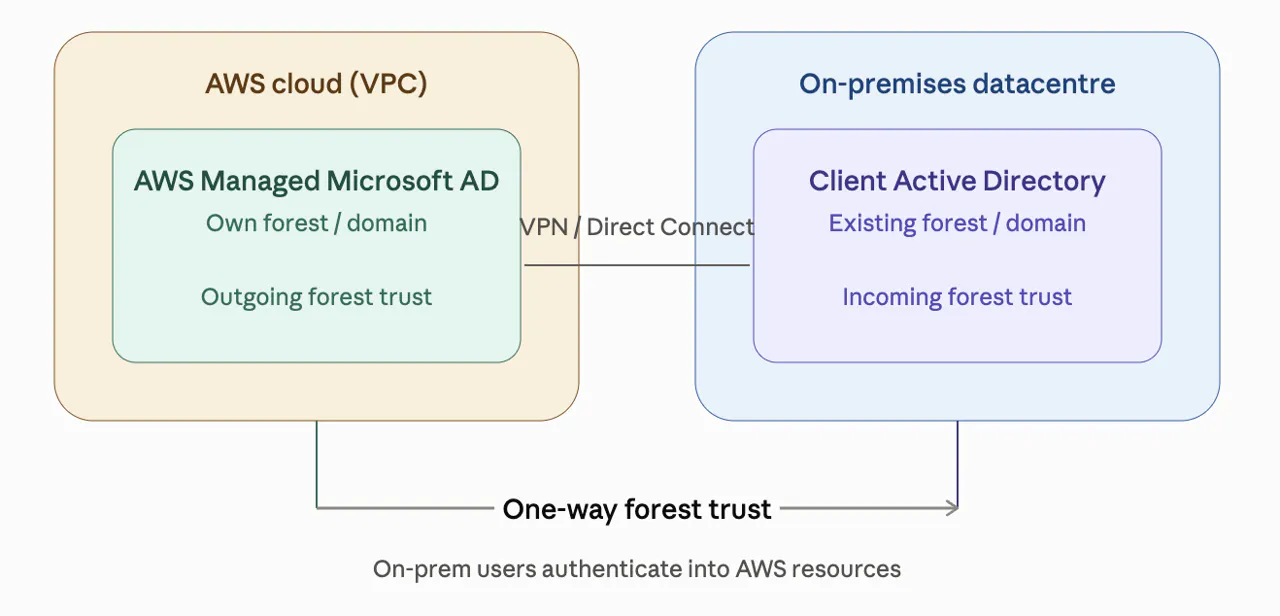
With the network in place, connecting the new MAD domain to the client's AD got a bit tricky. You need a forest trust between the two domains so users can authenticate across them. The key thing to get right is the direction: in a one-way trust, the trusting domain allows the trusted domain's users to authenticate — so which way you point it decides who can access what. (You can also set up a two-way trust if both sides need it.)
In my case, we only needed the on-prem AD users to authenticate to Aurora PostgreSQL DBs, so we set up a one-way trust: outgoing from AWS MAD and incoming on the on-prem AD. Check out this link explaining the differences between trust types, and this one from AWS covering trust types with AWS Managed AD and the Kerberos authentication flow.
The trust password
Setting up the trust, another big headache was the password for the trust. This password is separate from the admin account of the MAD — you just set the same password on both MAD and the client's AD when creating the trust. The thing to be careful about is the characters in the password: not all of them are allowed. Or perhaps they are, and there was a GPO somewhere blocking certain special characters — I'm not sure. But, Microsoft being Microsoft, problems can show up in different ways. For example, it might let you set the password with any characters but then fail when authenticating a user via Kerberos.
Share the MAD
After setting up the trust and confirming there's connectivity and DNS resolution between both ADs, you need to share the MAD with the target account where the Aurora PostgreSQL databases live. This is fairly easy once the networking is done — you just need IAM roles in the source and target accounts with permissions to share and to accept the share. You can do it from the Directory Service console.
At first I did this with GitHub Actions workflows, but then I moved it into a step of a State Machine where we automated the whole user creation and nesting.
Enabling Kerberos authentication on the Aurora PostgreSQL DB
The next step is enabling Kerberos authentication on the Aurora database itself. This is done by associating the DB instance with the shared directory, which lets database users authenticate with their AD credentials instead of a native PostgreSQL password.
In the DB settings, in the console, you'll find the following option (or you can set it via the API/CLI):
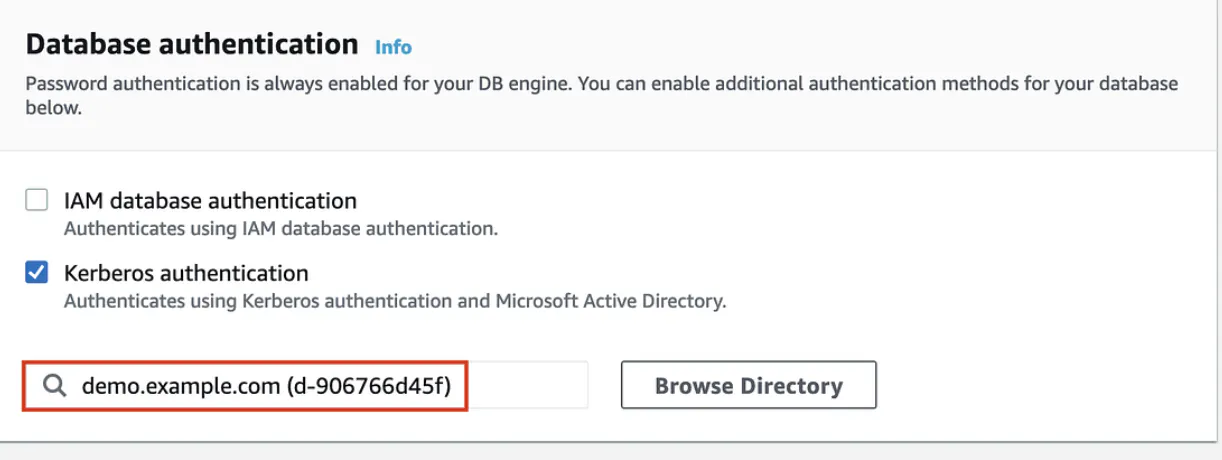
But enabling it is only half the story — now we need to actually let users in without creating accounts for each of them.
How do we connect the users?
Here comes a slightly tricky part. We don't want to create users in the MAD domain just to connect to the Aurora databases — and besides, we set up the trust relationship precisely so that on-prem AD users could authenticate instead. To make that work, we used the standard AD group model (AGDLP): a global security group in the on-prem AD, and a domain local security group in MAD.
I liked this diagram showing the AGDLP group nesting:
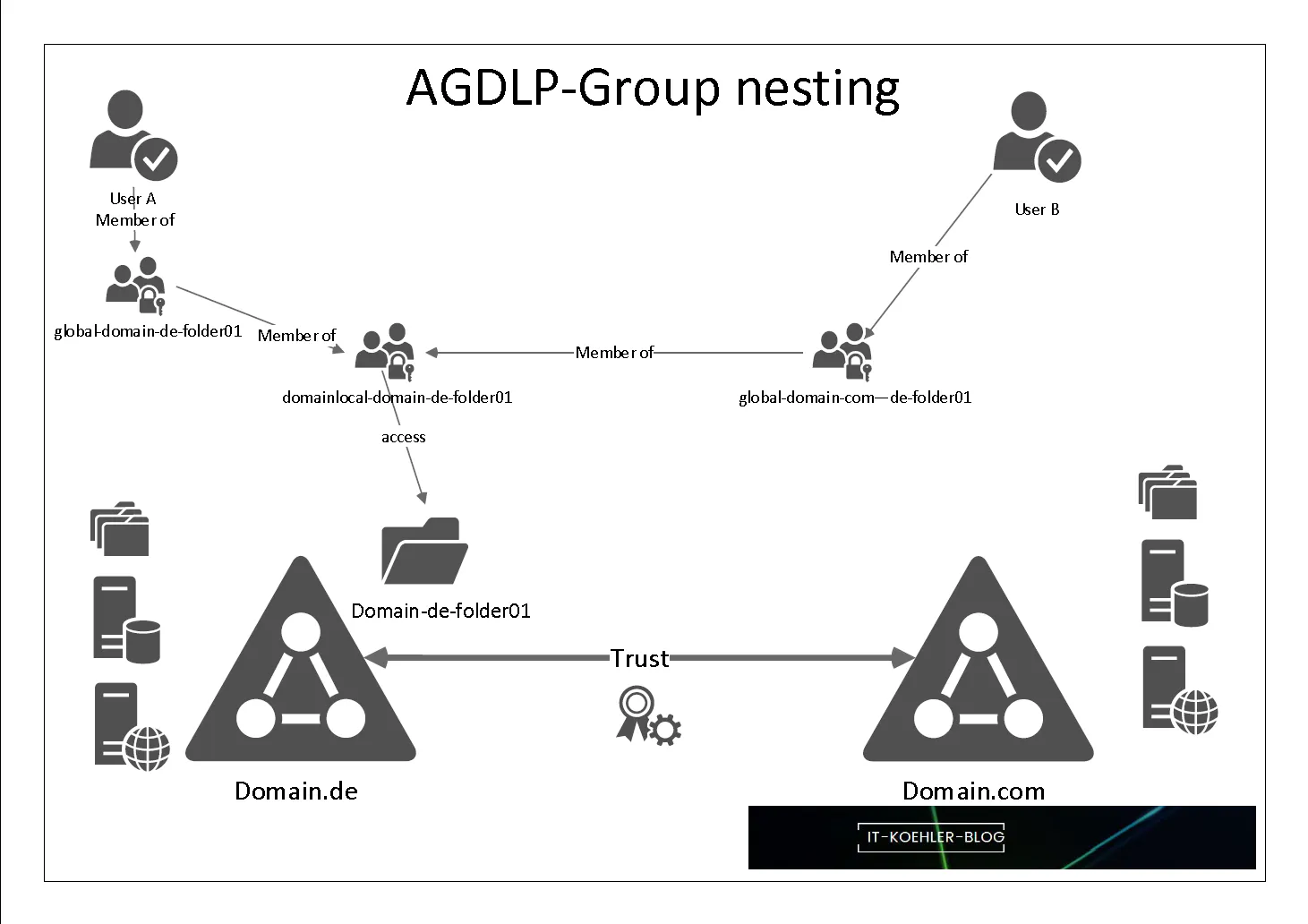
The flow is:
Create a global security group in the on-prem AD and add the AD user you want to grant access to.
Create a domain local security group in MAD, and nest the on-prem global group inside it. The trust relationship is what makes this cross-domain nesting possible.
In the Aurora database, create a database role —
db_reader, for example — and grant it therds_adrole so it's recognised as an AD-authenticated login.Map the domain local security group's SID to that
db_readerrole in the database, using thepg_ad_mappingextension. This SID-to-role mapping is what ties the AD group to the database user.
Once that's in place, any on-prem AD user added to the global group inherits access through the nested domain local group and logs into Aurora as db_reader — no per-user setup in the database, and no accounts created in MAD.
This article does a great job explaining the mapping inside the database in more detail.
Verify the whole chain
Before you go chasing weird authentication errors, sanity-check that everything can actually talk to each other end to end. You already opened the ports and set up DNS back at the start — now confirm it's all working together.
Test DNS resolution (both directions)
Run this from a machine in each domain to make sure the other domain's controllers resolve correctly:
nslookup on-prem-domain.local nslookup mad-domain.aws.local
You should get the domain controllers back for each. If either lookup fails, the trust will look fine but nothing will actually authenticate — fix the conditional forwarders before going further.
Confirm the DB client and Aurora can reach MAD
If you’re running the DB tool to connect to the DB from an EC2 instance, it must reach MAD to get a Kerberos ticket, and Aurora itself needs to talk to the directory for the authentication handshake. Both live in the VPC, so this is usually a security group question — make sure the client instance and the Aurora security group can hit MAD on the Kerberos and LDAP ports.
The end-to-end proof
From the client, request a ticket as an on-prem AD user:
kinit [email protected] klist
If you get a ticket, DNS and Kerberos are working across the trust — and you've proved the hardest part before even touching the database.
Note: the commands above assume a Linux EC2 client. On Windows, use klist and nltest instead:
klist nltest /sc_query:on-prem-domain.local
The final picture
So, essentially, this is what was deployed and configured:
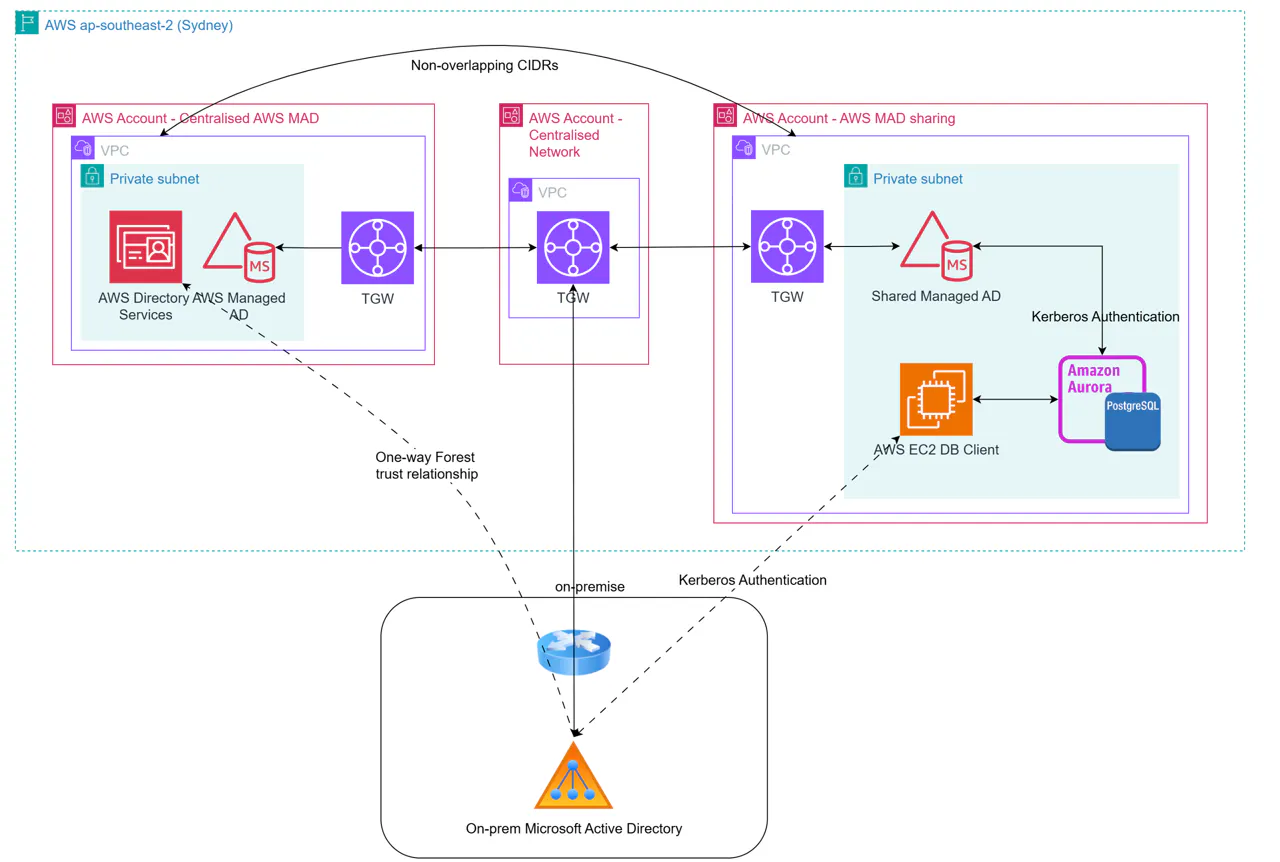
And this is how the Kerberos authentication flows across the domains in this implementation:
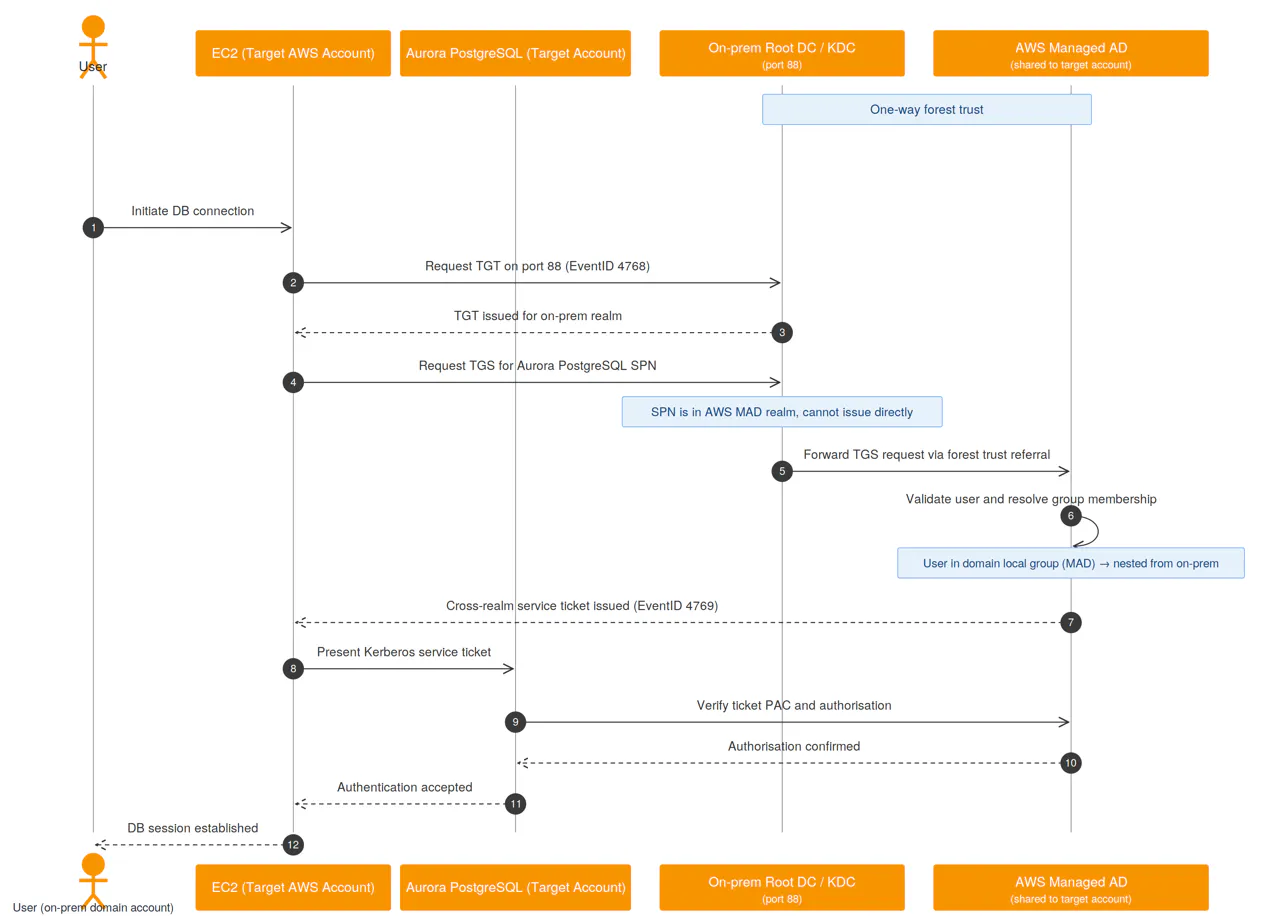
So what's actually happening when a user connects? It looks like a lot of steps, but it's really just Kerberos doing its thing across the trust. Each step below maps to the numbers in the diagram (if any of the acronyms are new, the glossary at the end has you covered):
Initiate DB connection — the user starts a database connection from the EC2 client.
Request TGT — the client asks the on-prem KDC for a Ticket-Granting Ticket, basically a "yes, this person is legit" token.
TGT issued — the KDC hands the ticket back. The user is now authenticated to the on-prem realm.
Request service ticket — the client asks the KDC for a ticket to reach the database's SPN. Catch: the database lives in the AWS MAD realm, so the on-prem KDC can't issue this one itself.
Forward via forest trust — this is where the trust earns its keep. The on-prem KDC refers the request over to AWS MAD.
Validate and resolve groups — MAD validates the user and resolves their group membership. This is the nesting we set up earlier: the on-prem user is in the global group, which is nested into the domain local group on the MAD side.
Cross-realm ticket issued — if that chain checks out, MAD issues the cross-realm service ticket.
Present ticket to Aurora — the client hands the ticket to Aurora.
Verify and authorise — Aurora verifies the ticket is valid and checks the user is authorised (steps 9–10 in the diagram).
Session established — the connection is accepted and the DB session is established (steps 11–12). The user is in, logged in as
db_reader, without a single account ever being created for them in AWS.
The nice thing is that once this is all wired up, the user doesn't see any of it. They just connect with their normal on-prem credentials and log in.
Conclusion
And that's the whole thing: on-prem AD users authenticating straight into Aurora PostgreSQL, no per-database accounts, no duplicated identities to manage. Instead of creating and maintaining isolated users across hundreds of accounts and thousands of databases, the client now grants access by dropping someone into an AD group and lets the trust and group nesting do the rest.
Most of the work is upfront — getting the network right, building the trust, wiring up the group model — but once it's in place it mostly runs itself. If you're drowning in database users across a large AWS estate, centralising on AWS Managed AD is well worth the setup.
Automating the rest — sharing the MAD, adding the on-prem user to the AD group, and doing the nesting — is another story. You could drive it with Lambdas or any other automated process. In this client's case, we did it with AWS Step Functions, and it turned out to be a neat piece of development. Maybe a topic for another post.
Glossary
A few terms and acronyms used throughout, roughly in the order they show up:
MAD — AWS Managed Microsoft AD. A managed Active Directory service, part of AWS Directory Service.
AD — Active Directory. Microsoft's directory service for managing users, groups, and authentication.
ENI — Elastic Network Interface. The virtual network card AWS attaches to the MAD domain controllers.
CIDR — Classless Inter-Domain Routing. The notation for an IP address range, e.g.
10.0.0.0/16.SG — Security Group. A stateful virtual firewall around AWS resources.
NACL — Network Access Control List. A stateless firewall at the subnet level.
DNS — Domain Name System. Resolves domain names to IP addresses; here, both directories must resolve each other.
Conditional forwarder — a DNS rule that sends lookups for a specific domain to a named set of DNS servers.
NTP — Network Time Protocol. Keeps clocks in sync; Kerberos fails if the two sides drift too far apart.
RPC — Remote Procedure Call. Underlying protocol for much AD communication.
LDAP / LDAPS — Lightweight Directory Access Protocol (and its TLS-secured variant). How directory data is queried.
Global Catalog — an AD service that holds a partial copy of every object in the forest, used for cross-domain lookups.
GPO — Group Policy Object. A set of AD-managed settings; one of these can quietly block certain password characters.
Forest trust — a trust relationship between two AD forests that lets users in one authenticate against resources in the other.
One-way trust — a trust in a single direction; the trusting side allows the trusted side's users in, not the reverse.
AGDLP — Accounts → Global groups → Domain Local groups → Permissions. The standard AD model for granting access via nested groups.
SID — Security Identifier. The unique ID AD assigns to every user and group; the DB maps this to a role.
rds_ad — the PostgreSQL role that marks a database role as AD-authenticated.
pg_ad_mapping — the Aurora PostgreSQL extension used to map an AD group's SID to a database role.
SPN — Service Principal Name. The unique identifier for a service (here, the database) that Kerberos issues tickets for.
KDC — Key Distribution Center. The Kerberos service (running on the domain controller) that issues tickets.
TGT — Ticket-Granting Ticket. The initial "you are who you say you are" ticket from the KDC.
TGS — Ticket-Granting Service. The KDC service that issues service tickets; also used to mean the service-ticket request itself.
Cross-realm ticket — a service ticket issued for a service in a different Kerberos realm, made possible by the trust.
PAC — Privilege Attribute Certificate. The chunk of a Kerberos ticket carrying the user's group memberships, which the service checks for authorisation.