


Written by Devang Dhameliya
Introduction
The artificial intelligence landscape has evolved dramatically, with AI agents becoming increasingly sophisticated in their ability to reason, plan, and execute complex tasks. AWS's recent release of Strands Agents represents a significant advancement in this space, offering an open-source SDK that simplifies agent development while maintaining enterprise-grade capabilities. This comprehensive guide explores how Strands Agents leverages the Model Context Protocol (MCP) to create powerful, extensible AI agents.
What is Strands Agents SDK?
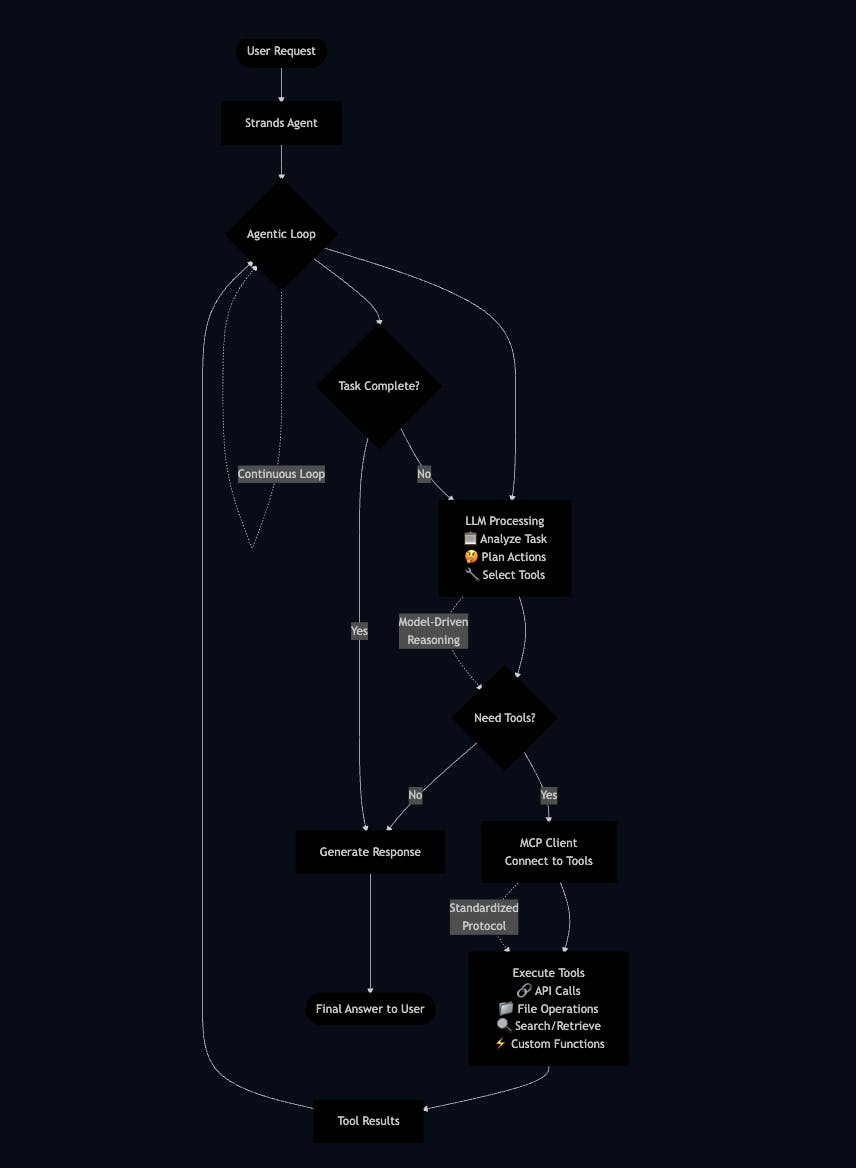
Strands Agent is an open-source SDK that takes a model-driven approach to building and running AI agents. Unlike traditional frameworks that require developers to define complex workflows, Strands embraces the native capabilities of state-of-the-art language models to plan, reason, call tools, and reflect on their actions.
Key Advantages of Strands Agents
Simplified Development: Build agents in just a few lines of code
Model-Driven Architecture: Leverages advanced model reasoning capabilities
Flexible Deployment: Scales from local development to production environments
Enterprise Adoption: Already used by multiple AWS teams including Amazon Q Developer, AWS Glue, and VPC Reachability Analyzer and more (https://awslabs.github.io/mcp/servers/aws-documentation-mcp-server).
The Three Core Components of Strands Agents
Strands Agents defines an agent using three fundamental components:
1. Model
Strands offers flexible model support across multiple providers:
Amazon Bedrock: Any model supporting tool use and streaming
Anthropic API: Claude model family integration
Llama API: Meta's Llama model family
Ollama: For local development scenarios
LiteLLM: Supporting providers like OpenAI and others
Custom Providers: Define your own model integrations
2. Tools
Tools extend agent capabilities through various mechanisms:
MCP Servers: Access to thousands of published Model Context Protocol servers
Pre-built Tools: 20+ example tools for file manipulation, API requests, and AWS integrations
Python Functions: Any Python function can become a tool using the @tool decorator
3. Prompt
Natural language instructions that define:
The agent's primary task
System-level behaviour guidelines
Context for task completion
Hands-On Example: Building Your First Strands Agent
Prerequisites
AWS account with Bedrock model access for Anthropic Claude 3.5 Sonnet in ap-southeast-2
AWS credentials configured locally
Python environment with Strands Agents SDK installed
Step 1: Install Strands Agents
pip install strands-agents strands-agents-toolsExample 1: Financial Analyst Agent
This example shows how to create a financial analyst agent using the strands library with a Python REPL tool. The agent uses the ‘yfinance’ Python module to fetch historical stock data for a given company (e.g., Nvidia) and saves the results as a date-stamped CSV file using the file write tool—all autonomously.
from strands_tools import python_repl, file_write
from strands.models import BedrockModel
from strands import Agent, tool

import os
# Enable tool consent bypass for automated execution

os.environ["BYPASS_TOOL_CONSENT"] = "true"

# Configure Bedrock model

bedrock_model = BedrockModel(

    model_id="anthropic.claude-3-5-sonnet-20241022-v2:0",

    region_name="ap-southeast-2",

    temperature=0.1,

)

# Define financial analysis system prompt

prompt = """

Use yfinance module to retrieve the historical data.

Provide detailed analysis of stock provided in prompt.

Write the results as a CSV file named report_{date}.csv.

"""

# Create agent with pre-built tools

agent = Agent(

    tools=[python_repl, file_write],

    system_prompt=prompt,

    model=bedrock_model

)

# Execute financial analysis

response = agent("Nvidia")
Example 2: AWS Architecture Design Agent
This example demonstrates how to build a specialised AWS Solutions Architect agent that can query AWS documentation, generate infrastructure diagrams and provide Cloudformation template to create suggested infrastructure in diagram using MCP integration:
from mcp import StdioServerParameters, stdio_client
from strands import Agent

from strands.models import BedrockModel

from strands.tools.mcp import MCPClient

from IPython.display import Image, display  # Import for displaying images

import os

aws_diag_client = MCPClient(lambda: stdio_client(

        StdioServerParameters(

            command="uvx", args=["awslabs.aws-diagram-mcp-server@latest"]

        )

    )

)

bedrock_model = BedrockModel(

    model_id="anthropic.claude-3-5-sonnet-20241022-v2:0",

    region_name="ap-southeast-2",

    temperature=0.1,

)

SYSTEM_PROMPT = """

You are an expert AWS Certified Solutions Architect. Your role is to help customers understand best practices on building on AWS.

You can query the AWS Documentation and generate diagrams, When you generate a diagram.

Always provide clear, actionable advice with cloud formation template to create this infrastructure from digram. default region is ap-southeast-2.

You MUST tell the customer the full file path of the diagram in the format "The diagram is saved at: <filepath>",

"""

# Set up diagram output directory

diagram_dir = "./generated-diagrams"

os.makedirs(diagram_dir, exist_ok=True)

# Main logic block using aws_diag_client

with aws_diag_client:

    # docs_tools = aws_docs_client.list_tools_sync()

    # diagram_tools = aws_diag_client.list_tools_sync()

    all_tools = aws_diag_client.list_tools_sync()

    agent = Agent(tools=all_tools, model=bedrock_model, system_prompt=SYSTEM_PROMPT)

    query = "Design a real-world AWS architecture for a global SaaS application that must serve millions of users with low latency, strong security controls, and predictable costs."

    print(f"Sending query to agent: {query}\n")

# Run the query through the agent

    agent_result = agent(query)

# Extract textual content from agent_result

    final_agent_response_text = ""

    if hasattr(agent_result, 'response') and isinstance(agent_result.response, str):

        final_agent_response_text = agent_result.response

    elif hasattr(agent_result, 'content') and isinstance(agent_result.content, str):

        final_agent_response_text = agent_result.content

    elif hasattr(agent_result, 'output') and isinstance(agent_result.output, str):

        final_agent_response_text = agent_result.output

    elif isinstance(agent_result, str):

        final_agent_response_text = agent_result

    else:

        try:

            final_agent_response_text = str(agent_result)

            print("DEBUG: Converted agent_result to string.")

        except Exception as e:

            print(f"ERROR: Could not extract text from AgentResult. Error: {e}")

            print("Please inspect the 'agent_result' object to determine the correct attribute.")

# Print agent response

    print("\n--- Agent's Full Response Text ---")

    print(final_agent_response_text)

    print("--- End of Agent's Full Response Text ---\n")

 # Try to extract diagram path from response

    diagram_path = None

    if final_agent_response_text:

        path_marker = "The diagram is saved at: "

        if path_marker in final_agent_response_text:

            start_index = final_agent_response_text.find(path_marker) + len(path_marker)

            end_index = final_agent_response_text.find("\n", start_index)

            end_index = end_index if end_index != -1 else len(final_agent_response_text)


            diagram_path_raw = final_agent_response_text[start_index:end_index].strip()

            diagram_path = diagram_path_raw.strip("`'\"")


            print(f"\nExtracted diagram path: '{diagram_path}'")


            if diagram_path and os.path.exists(diagram_path):

                print(f"Displaying diagram from: {diagram_path}")

                display(Image(filename=diagram_path))

            elif diagram_path:

                print(f"Diagram file not found at: {diagram_path}")

                print(f"Current working directory: {os.getcwd()}")

                expected_dir = os.path.dirname(diagram_path)

                if os.path.exists(expected_dir):

                    print(f"Directory '{expected_dir}' exists with files: {os.listdir(expected_dir)}")

                else:

                    print(f"Directory '{expected_dir}' does NOT exist.")

        else:

            print("Agent response did not include a diagram path in the expected format.")

    else:

        print("No textual response extracted from the agent's result.")
Output
Shell Output:
Installed 57 packages in 242ms
Sending query to agent: Design a real-world AWS architecture for a global SaaS application that must serve millions of users with low latency, strong security controls, and predictable costs.

I'll help you design a scalable, secure, and cost-effective SaaS architecture on AWS. Let me create a comprehensive diagram and then explain the components along with best practices and provide a CloudFormation template.

First, let's generate a diagram showing the architecture:

Tool #1: generate_diagram

I apologize for the error. Let me correct the diagram code:

Tool #2: generate_diagram

I apologize for the continued errors. Let me make one final correction to the diagram code:

Tool #3: generate_diagram

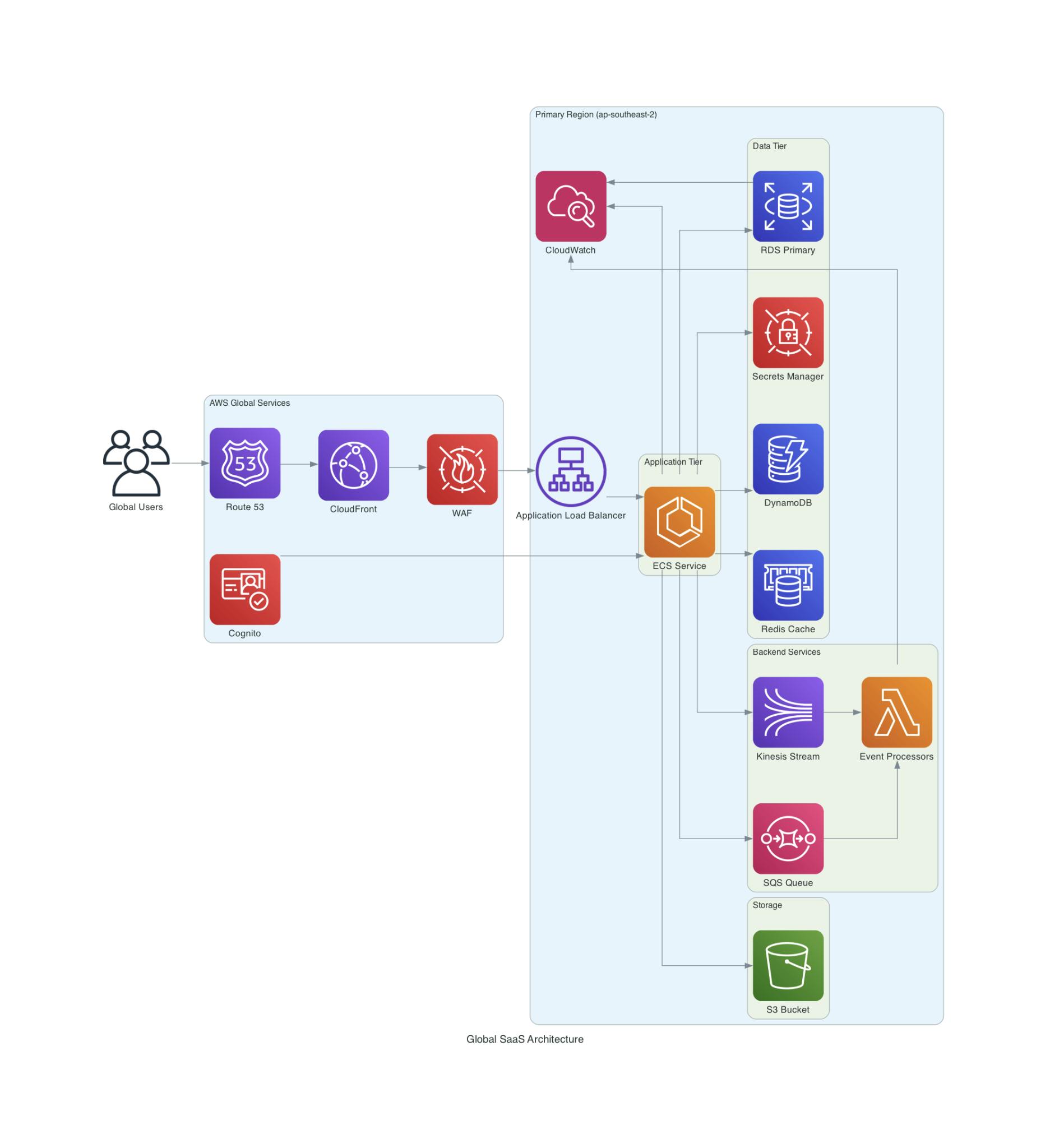
The diagram is saved at: /tmp/generated-diagrams/diagram_b587d438.png

Let me explain the architecture and provide best practices for each component:

1. Global User Access Layer:

- Route 53 with latency-based routing for global DNS resolution

- CloudFront CDN for static content delivery and edge caching

- AWS WAF for protection against web exploits

- Cognito for user authentication and authorization

2. Application Tier:

- Application Load Balancer for HTTP/HTTPS traffic distribution

- ECS (Elastic Container Service) for containerized applications

- Auto-scaling based on demand

- Multiple Availability Zones for high availability

3. Backend Services:

- Lambda for event-driven processing

- SQS for reliable message queuing

- Kinesis for real-time data streaming

4. Data Tier:

- RDS for relational data with Multi-AZ deployment

- ElastiCache (Redis) for high-performance caching

- DynamoDB for NoSQL data with global tables

- Secrets Manager for secure credentials management

5. Storage:

- S3 for object storage with lifecycle policies

6. Monitoring:

- CloudWatch for monitoring and alerting

- CloudWatch Logs for centralized logging

Here's a CloudFormation template to create the core infrastructure:

```yaml

AWSTemplateFormatVersion: '2010-09-01'

Description: 'Global SaaS Application Infrastructure'

Parameters:

  EnvironmentName:

    Type: String

    Default: 'prod'

  VpcCIDR:

    Type: String

    Default: '10.0.0.0/16'

Resources:

  # VPC and Networking

  VPC:

    Type: AWS::EC2::VPC

    Properties:

      CidrBlock: !Ref VpcCIDR

      EnableDnsHostnames: true

      EnableDnsSupport: true

      Tags:

        - Key: Name

          Value: !Sub ${EnvironmentName}-vpc

...

Best Practices and Recommendations:

1. Security:

- Enable AWS WAF rules for common exploits

- Use AWS Secrets Manager for credential rotation

- Implement least privilege IAM roles

- Enable encryption at rest for all services

- Use VPC endpoints for AWS services

2. Performance:

- Implement caching at multiple layers (CloudFront, ElastiCache)

- Use DynamoDB for high-throughput requirements

- Configure Auto Scaling for ECS tasks

- Use RDS read replicas for read-heavy workloads

3. Cost Optimization:

- Use Savings Plans for predictable workloads

- Implement S3 lifecycle policies

- Use Fargate Spot for non-critical workloads

- Enable DynamoDB auto-scaling

4. Reliability:

- Deploy across multiple AZs

- Implement circuit breakers and fallbacks

- Use SQS dead-letter queues

- Configure automated backups

- Implement health checks and monitoring

5. Operational Excellence:

- Use AWS CloudWatch for monitoring

- Implement automated alerting

- Use Infrastructure as Code (CloudFormation)

- Maintain proper tagging strategy

To deploy this infrastructure:

1. Save the CloudFormation template as saas-infrastructure.yaml

2. Deploy using AWS CLI:

```bash

aws cloudformation create-stack \

  --stack-name global-saas-infrastructure \

  --template-body file://saas-infrastructure.yaml \

  --capabilities CAPABILITY_IAM \

  --region ap-southeast-2

```

This architecture provides a solid foundation for a global SaaS application with the ability to scale to millions of users while maintaining security, performance, and cost-effectiveness.DEBUG: Converted agent_result to string.

--- End of Agent's Full Response Text ---

Extracted diagram path: '/tmp/generated-diagrams/diagram_b587d438.png'

Displaying diagram from: /tmp/generated-diagrams/diagram_b587d438.pngFuture Developments
The Strands Agents project continues to evolve with planned features including:
Agent2Agent (A2A) Protocol: Enhanced multi-agent communication capabilities
Additional Model Provider Support: Expanding compatibility with emerging model providers
Enhanced Observability: More sophisticated monitoring and debugging tools
Conclusion
Strands Agents represents a significant advancement in AI agent development, combining the power of modern language models with the flexibility of MCP integration. By embracing a model-driven approach, developers can create sophisticated agents that leverage the natural reasoning capabilities of LLMs while maintaining the ability to extend functionality through external tools and services.
The combination of Strands' simplified development model and MCP's standardised tool integration creates a powerful platform for building production-ready AI agents. Whether you're developing simple task automation or complex multi-agent systems, Strands Agents provides the foundation for scalable, maintainable AI solutions.
As the AI agent ecosystem continues to mature, tools like Strands Agents and protocols like MCP will play crucial roles in democratising AI development and enabling organisations to build sophisticated AI capabilities that can scale from prototype to production.
Getting Started
To begin building with Strands Agents:
Visit the Documentation: strandsagents.com
Explore the GitHub Repository: github.com/strands-agents
Try the Examples: Start with the code examples above to understand practical implementation
The future of AI agents is here, and with Strands Agents and MCP integration, that future is more accessible than ever before.