


Introduction
Secure file transfer remains a critical requirement for organisations in industries such as finance, logistics, and government.
Traditional SFTP servers come with significant operational overhead — managing EC2 instances or on-premises servers, patching, scaling, and ensuring high availability.
With AWS, organisations can now modernise this process using a serverless SFTP model built on the AWS Transfer Family, reducing cost and complexity while maintaining strong security and compliance.
In this post, we’ll look at:
How SFTP has evolved from open-source to commercial, then to managed solutions
What AWS Transfer Family offers
The advantages on operation and cost
How we built a scalable, secure, and automated serverless SFTP platform on AWS
Traditional SFTP Hosting Options
Open-Source SFTP Servers
These are open-source SFTP software products you install on your own infrastructure (on-prem, VM, EC2, etc.).
Examples: OpenSSH (Linux), ProFTPD (Linux), FileZilla Server (Windows)
Characteristics
Free and open-source
Flexible and customisable
Limitations
Manual OS patching and hardening
No built-in scaling or high availability
Limited audit and monitoring
High operational overhead
Commercial SFTP Servers
These are SFTP software products from third-party vendors to install on your own infrastructure.
Examples: Cerberus FTP Server (Windows), CompleteFTP (Windows), Bitvise SSH Server (Windows), SFTP Gateway (Linux)
Benefits (vs open-source SFTP servers)
Vendor support and SLAs
GUI-based management
LDAP/AD integration and role-based access
Limitations
Fix term license model: monthly / yearly
User still provides EC2 or On-Prem infrastructure
Manual maintenance and scaling
Limited customisation
Supported OS: Mainly Windows servers
Managed SFTP Services
These services are hosted and managed by the vendor, so you don't need to worry about provisioning infrastructure, software patching, or scaling. They are ideal for organizations seeking quick setup, secure data transfers, and minimal operational overhead.
Examples: Files.com, GoAnywhere, Couchdrop
Benefits (vs software-based SFTP servers)
No infrastructure to manage
High availability with vendor SLAs
Pay-as-you-go pricing model
Limitations
Higher recurring cost
Limited customisation
Possible data-residency constraints
AWS Transfer Family
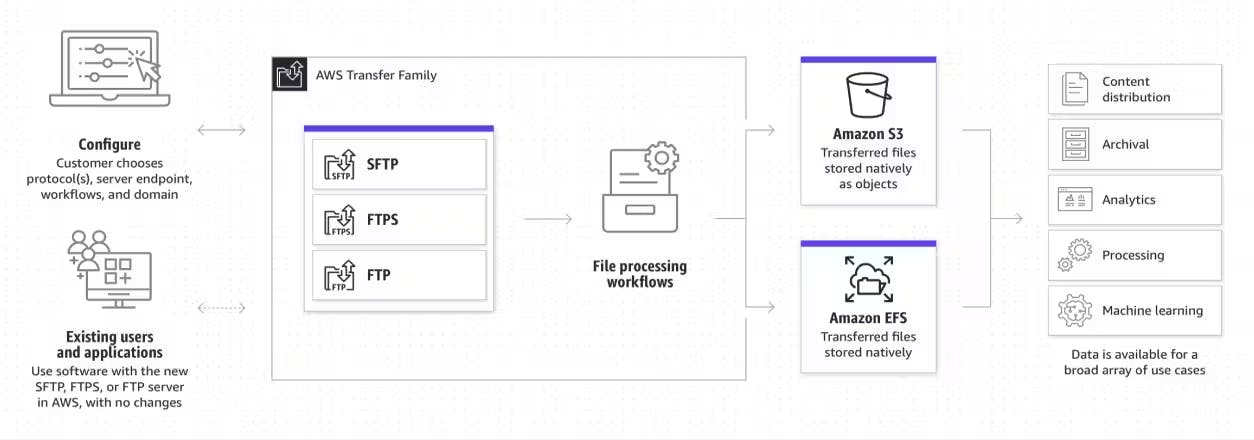
So is there a managed SFTP solution with customised features based on business requirements, and also has more cost effective pricing? Yes. AWS Transfer Family is a fully managed, cloud-native service that enables secure file transfer over SFTP, FTPS, and FTP directly into and out of Amazon S3 or EFS, without provisioning or managing servers.
Key Features
Protocols: SFTP, FTPS, FTP
Serverless: No EC2 or patching required
Native integrations: Amazon S3 and EFS
Encryption: AWS KMS and TLS
Fine-grained access control: IAM
VPC support: Private connectivity
Monitoring: CloudWatch logs and metrics
Automation-ready: Integrates with Lambda, EventBridge, and SNS
Benefits
Zero infrastructure management: No need to maintain servers or operating systems
Elastic scalability: Automatically scales based on concurrent connections and throughput
High availability: Multi-AZ endpoint architecture ensures resilience
Enterprise-grade security: Integrates with AWS IAM, KMS, and VPC for strong access control
Cost efficiency: Pay only for what you use — endpoint hours and data transfer
Compliance and audit readiness: Native logging, encryption, and monitoring capabilities
Seamless integration: Easily integrates with other AWS services for event-driven workflows
Pricing Model
AWS Transfer Family pricing is pay-as-you-go, based on endpoint uptime, data transfer, and file storage.
No upfront costs, no long-term contracts.
Component
Price
Notes
SFTP/FTPS/FTP Endpoint Hours
$0.30/hour (~$216/month 24×7)
Per endpoint, regardless of activity
Data Uploads/Downloads
$0.04/GB
For inbound and outbound data
Web Apps
$0.50/hour (~$360/month)
Time a web app is enabled
Amazon S3 Storage
$0.025/GB
Standard S3 pricing
(Reference: AWS Transfer Family Pricing — https://aws.amazon.com/aws-transfer-family/pricing/)
Pricing Examples
Example 1: Single Endpoint + S3 Storage
Use Case: SFTP + 20 users + download 1GB/day + 100GB storage
Item
Calculation
Cost
SFTP endpoint
$0.30 × 24 × 30
$216.00
SFTP data upload/download
$0.04 × 1 GB × 30 days
$1.20
S3 storage
$0.025 × 100 GB
$2.50
Total Monthly Bill
$219.70
Example 2: Single Endpoint + S3 Storage
Use Case: SFTP + 100 users + download 50GB/day + 1TB storage
Item
Calculation
Cost
SFTP endpoint
$0.30 × 24 × 30
$216.00
SFTP data upload/download
$0.04 × 50 GB × 30 days
$60.00
S3 storage
$0.025 × 1,024 GB
$25.60
Total Monthly Bill
$301.60
Example 3: Multiple Endpoints + S3 Storage
Use Case:
SFTP endpoint: 500 users, upload 100GB/day, download 50GB/day
FTPS endpoint: 500 users, upload 100GB/day, download 50GB/day
S3 storage: 20TB
Item
Calculation
Cost
SFTP endpoint
$0.30 × 24 × 30
$216.00
SFTP data transfer
$0.04 × (100GB + 50GB) × 30
$180.00
FTPS endpoint
$0.30 × 24 × 30
$216.00
FTPS data transfer
$0.04 × (100GB + 50GB) × 30
$180.00
S3 storage
$0.025 × 1,024 GB × 20
$512.00
Total Monthly Bill
$1,304.00
Pricing advantage
The advantage of this pricing model is that endpoint cost remains a fixed cost regardless of activities. Therefore, the heavier the transfer traffic is, the more cost effective it will be on per GB of data transfer cost. For example, on enterprise level transfer usage like example 3 (> 10 times the data transfer usage), for traditional commercial SFTP server, you would have 10 times the cost for hosting infrastructure to cater for the required bandwidth. Comparatively, for SFTP transfer family solution, the cost is only 2-3 times more due to endpoint cost remaining the same.
Architecture Overview
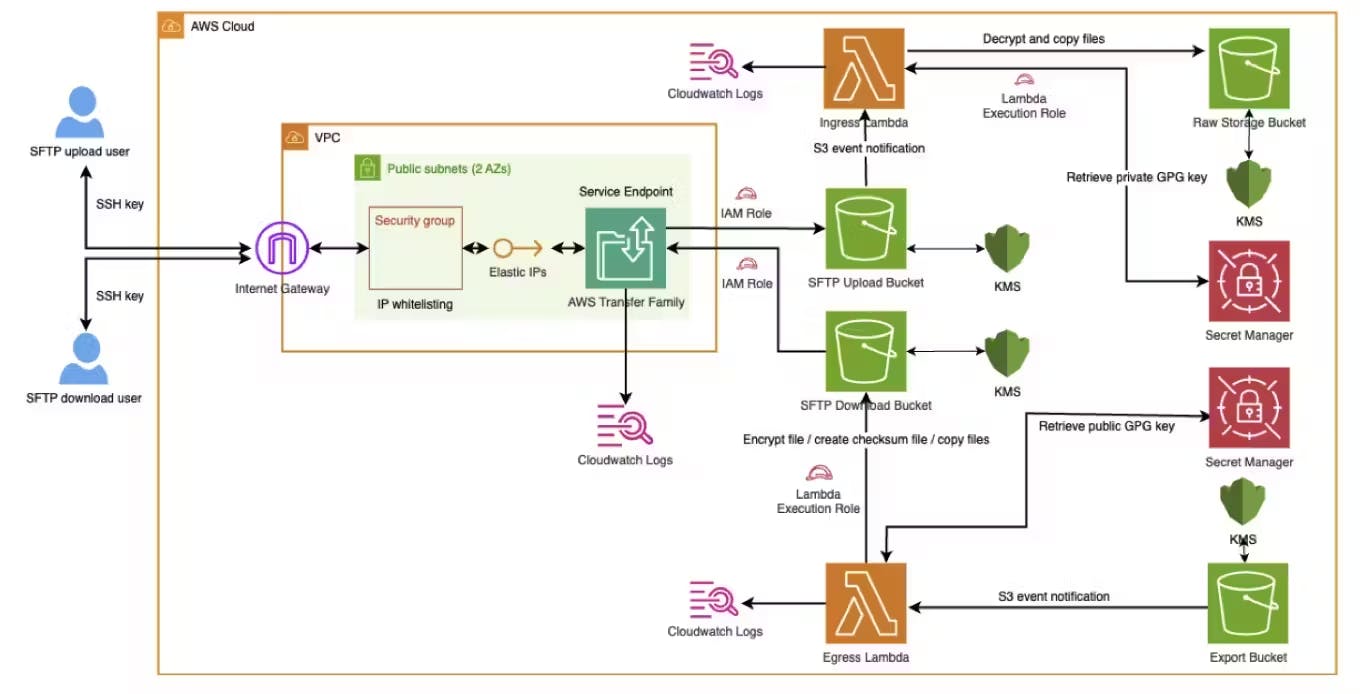
This diagram is the architecture overview of our design of transfer family which includes below core functionalities.
Core functionalities
Client IP whitelisting
Client side encryption/decryption with GPG key
Server-side encryption at-rest with KMS CMK
Encryption in-transit with enforced SSL
File checksum integrity validation
All environments (Dev, Test, Prod) are deployed using AWS CDK (Python) for consistency.
SFTP upload process: User uploads files via SFTP client -> Transfer Family service endpoint -> Upload Bucket. New files in bucket triggers Ingress Lambda function via event notification. Ingress Lambda function retrieves private GPG key from secret manager, decrypt the files and then copy decrypted files to Raw Storage Bucket.
SFTP download process: System puts files in Export Bucket, new files trigger Egress Lambda function via event notification, Lambda function retrieves public GPG key, and encrypt the files, create checksum files for integrity purpose (optional), then copy all files to SFTP Download Bucket. SFTP download user can view and download these encrypted files from SFTP client via Transfer Family Service endpoint.
#### VPC stack

- VPC (small CIDR range for hosting SFTP server only)
- Public subnets
- Internet gateway
- security group (IP whitelisting)

#### Lambda layer stack

- Lambda layer including GPG binary and GPG libraries

#### S3 Lambda stack

- SFTP upload bucket
- SFTP download bucket
- processed file storage bucket
- export bucket
- event notification for SFTP upload bucket
- event notification for export bucket
- Ingress lambda function / permissions / log group
- Egress lambda function / permissions / log group
- KMS key
- secret (for GPG private key)
- secret (for GPG public key)

#### Transfer Family stack

Firstly create below resources:

- SFTP transfer family server
- cloudwatch log group for transfer family server

Secondly create below resources for EACH external client:

- SFTP upload user
- SFTP download user
- IAM role for upload user
- IAM role for download user
- whitelisted IPs
Implementation Guide
Configuration
Configuration file per environment
Configuration for Transfer Family
Configuration per client
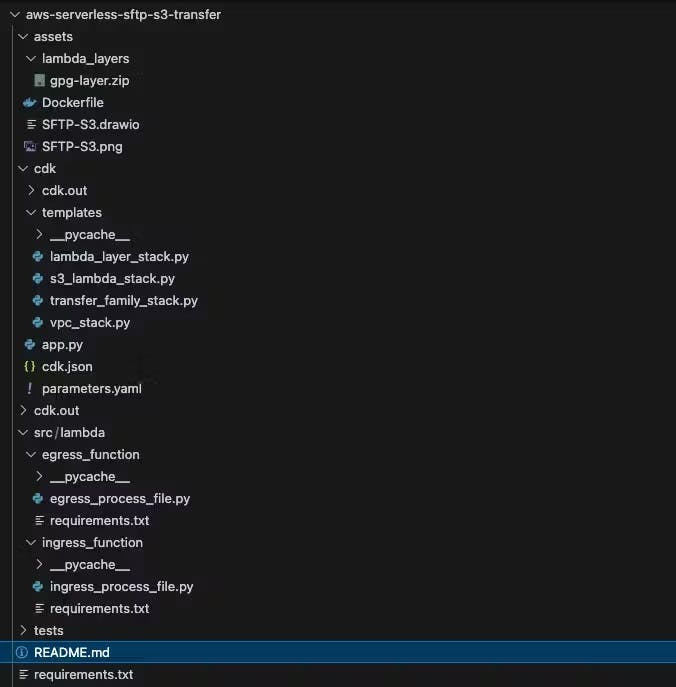
Project repository structure
We use 3 separate cdk nested stacks to create resources for vpc / transfer family / lambda and others.
Disclaimer: full code statements, exception handling, validation and tests have been omitted from below snippet example, but it is crucial to include them in your production code. The purpose of below snippets are to demonstrate the code structures of core components on high level.
Parameters
The project is fully customisable by specifying parameters.yaml file. You can modify these parameters for initial deployment or existing stack modification. Re-deploying the stacks with different parameters will recreate affected resources based on new parameter values. E.g. add allowed IPs to IP whitelisting, add/remove clients, etc.
Parameter example snippet
vpc:
  name: "sftp-transfer-family-vpc"
  cidr: "xxx.xxx.xxx.xxx/xx"
  max_azs: 2
transfer_family:
  transfer_protocols: "SFTP"
  security_policy_name: "TransferSecurityPolicy-xxxx-xx"
tag:
  - tag_key: "Name"
    tag_value: "AWS Serverless Transfer Family S3 Project"
  - tag_key: "Developer"
    tag_value: "Stanley Zhang"
clients:
  - name: "sftp-client-1"
    whitelist_ips:
      - ip: "xxx.xxx.xxx.xxx/xx"
    encrypted_file_extensions:
      - extension: "gpg"
      - extension: "pgp"
    checksum: "md5"
    memory_size: 512
    upload_user: "yes"
    download_user: "yes"
    upload_ssh_public_key: "xxxxxxxxxxxxx"
    download_ssh_public_key: "xxxxxxxxxxxxx"
  - name: "sftp-client-2"
    whitelist_ips:
      - ip: "xxx.xxx.xxx.xxx/xx"
    encrypted_file_extensions:
      - extension: "gpg"
      - extension: "pgp"
      - extension: "asc"
    checksum: "md5"
    memory_size: 1024
    upload_user: "yes"
    download_user: "yes"
    upload_ssh_public_key: "xxxxxxxxxxxxx"
    download_ssh_public_key: "xxxxxxxxxxxxx"

...
Core module code snippet
VPC stack: This stack creates the foundation VPC and required networking resources: internet gateway, elastic IP, subnet, route table, security group.
class VpcStack(Stack):
    def __init__(self, scope: Construct, id: str, **kwargs) -> None:
        super().__init__(scope, id, **kwargs)

        # Load parameters from parameters.yaml file
        script_dir = os.path.dirname(__file__)
        params_file = os.path.join(script_dir, '..', 'parameters.yaml')
        with open(params_file, "r") as file:
            params = yaml.safe_load(file)

        vpc_name = params['vpc']['name']
        cidr     = params['vpc']['cidr']
        max_azs  = params['vpc']['max_azs']

        # Create a VPC
        vpc = ec2.Vpc(self, "Vpc",
            vpc_name=vpc_name,
            max_azs=max_azs,
            subnet_configuration=[
                ec2.SubnetConfiguration(
                    name="PublicSubnet",
                    subnet_type=ec2.SubnetType.PUBLIC,
                    cidr_mask=26
                )
            ],
            ip_addresses=ec2.IpAddresses.cidr(cidr)
        )

        # Add a route table to the public subnets
        for subnet in vpc.public_subnets:
            route_table = ec2.CfnRouteTable(self, f"PublicRouteTable{subnet.node.id}",
                vpc_id=vpc.vpc_id
            )
            ec2.CfnRoute(self, f"DefaultRoute{subnet.node.id}",
                route_table_id=route_table.ref,
                destination_cidr_block="0.0.0.0/0",
                gateway_id=vpc.internet_gateway_id
            )
            ec2.CfnSubnetRouteTableAssociation(self, f"SubnetRouteTableAssociation{subnet.node.id}",
                subnet_id=subnet.subnet_id,
                route_table_id=route_table.ref
            )

        # Create Elastic IPs, one for each public subnet
        elastic_ip_allocation_ids = []
        for i, subnet in enumerate(vpc.public_subnets):
            elastic_ip = ec2.CfnEIP(self, f"ElasticIP{i}",
                domain="vpc"
            )
            elastic_ip_allocation_ids.append(elastic_ip.attr_allocation_id)

            # Output the allocation ID of each Elastic IP
            CfnOutput(self, f"ElasticIPAllocationIdOutput{i}",
                value=elastic_ip.attr_allocation_id,
                description=f"The allocation ID of Elastic IP {i+1}",
                export_name=f"ElasticIPAllocationIdOutput{i}"
            )

        # Create a Security Group
        security_group = ec2.SecurityGroup(self, "SecurityGroup",
            vpc=vpc,
            security_group_name="TransferFamilySecurityGroup",
            description="Security group for IP whitelisting of Transfer Family server"
        )
...
S3 Lambda Stack: for each SFTP client, creates upload / download buckets, s3 event notifications, lambda functions, KMS keys and secrets.
class S3LambdaStack(Stack):

    def __init__(self, scope: Construct, id: str, **kwargs) -> None:
        super().__init__(scope, id, **kwargs)

        # Import the GPG Lambda Layer ARN from LambdaLayerStack
        gpg_layer_arn = Fn.import_value("GpgLayerArn")

        gpg_layer = _lambda.LayerVersion.from_layer_version_arn(
            self, "ImportedGpgLayer", layer_version_arn=gpg_layer_arn
        )

        # Load parameters from parameters.yaml file
        script_dir = os.path.dirname(__file__)
        params_file = os.path.join(script_dir, '..', 'parameters.yaml')
        with open(params_file, "r") as file:
            params = yaml.safe_load(file)

        clients = params.get('clients', [])

        # Loop through all clients
        for client in clients:
            client_name                  = client.get('name')
            encrypted_file_extensions    = client.get('encrypted_file_extensions')
            checksum_algorithm           = client.get('checksum')
            lambda_memory_size           = client.get('memory_size')
            upload_user                  = client.get('upload_user')
            download_user                = client.get('download_user')
            upload_bucket_name           = f"{client_name}-upload"
            processed_upload_bucket_name = f"{client_name}-raw-storage"
            download_bucket_name         = f"{client_name}-download"
            export_bucket_name           = f"{client_name}-export"
            ingress_function_name        = f"{client_name}-IngressFileProcessingLambda"
            egress_function_name         = f"{client_name}-EgressFileProcessingLambda"
            ingress_function_log_group   = f"{client_name}-IngressFileProcessingLambdaLogGroup"
            egress_function_log_group    = f"{client_name}-EgressFileProcessingLambdaLogGroup"

            # Use the first extension for encryption extension
            encryption_extension = encrypted_file_extensions[0]['extension']

            # Construct commar separated string for all supported encryption extensions (for identifying ingress encrypted files)
            encrypted_file_extensions_str = ','.join([ext['extension'] for ext in encrypted_file_extensions])

            # Create a KMS Key for each client
            kms_key = kms.Key(self, f"{client_name}-kms-key",
                alias=f"alias/{client_name}-transfer-family-key",
                enable_key_rotation=True,
                removal_policy=RemovalPolicy.DESTROY
            )

            tags = params.get('tag', [])

            for tag in tags:
                tag_key = tag.get('tag_key')
                tag_value = tag.get('tag_value')

                Tags.of(kms_key).add(tag_key, tag_value)

            # Export value
            CfnOutput(self, f"{client_name}-KmsKeyArn",
                value=kms_key.key_arn,
                export_name=f"{client_name}-KmsKeyArn"
            )

            if download_user == "yes":
                # Create a Secrets Manager secret to store GPG public key
                egress_secret = secretsmanager.Secret(self, f"{client_name}-egress-secret",
                    secret_name=f"/transferfamily/{client_name}/gpg-public-key",
                    # After deployment, replace secret_string_value with the actual GPG public key
                    secret_string_value=SecretValue.unsafe_plain_text( "-----BEGIN PGP PUBLIC KEY BLOCK-----\n<YOUR GPG PUBLIC KEY HERE>\n-----END PGP PUBLIC KEY BLOCK-----"
                    ),
                    encryption_key=kms_key
                )

                # Create download bucket
                download_bucket = s3.Bucket(self, download_bucket_name,
                    bucket_name=download_bucket_name,
                    encryption=s3.BucketEncryption.KMS,
                    encryption_key=kms_key,
                    block_public_access=s3.BlockPublicAccess.BLOCK_ALL,
                    removal_policy=RemovalPolicy.DESTROY,
                    auto_delete_objects=True
                )

                # Enforce SSL
                download_bucket.add_to_resource_policy(
                    iam.PolicyStatement(
                        actions=["s3:*"],
                        resources=[download_bucket.bucket_arn, f"{download_bucket.bucket_arn}/*"],
                        effect=iam.Effect.DENY,
                        principals=[iam.AnyPrincipal()],
                        conditions={
                            "Bool": {
                            "aws:SecureTransport": "false"
                            }
                        }
                    )
                )

                # Create export bucket
                ...

                # Create the egress Lambda function
                egress_lambda_function = _lambda.Function(
                    self,
                    egress_function_name,
                    runtime=_lambda.Runtime.PYTHON_3_11,
                    timeout=Duration.seconds(120),
                    architecture=_lambda.Architecture.ARM_64,
                    memory_size=lambda_memory_size,
                    handler="egress_process_file.lambda_handler",
                    code=_lambda.Code.from_asset("../src/lambda/egress_function",
                        bundling=BundlingOptions(
                            image=_lambda.Runtime.PYTHON_3_11.bundling_image,
                            bundling_file_access=BundlingFileAccess.VOLUME_COPY,
                            command=[
                                "bash", "-c",
                                "pip install --no-cache -r requirements.txt -t . && cp -r . /asset-output/"
                            ]
                        )
                    ),
                    layers=[gpg_layer],
                    environment={
                        "destination_bucket_name": download_bucket_name,
                        "secret_arn": egress_secret.secret_arn,
                        "encrypted_file_extension": encryption_extension,
                        "checksum_algorithm": checksum_algorithm
                    }
                )

                # Lambda Log Group
                egress_log_group = logs.LogGroup(
                    self,
                    egress_function_log_group,
                    log_group_name=f"/aws/lambda/{egress_lambda_function.function_name}",
                    retention=logs.RetentionDays.ONE_WEEK,
                    removal_policy=RemovalPolicy.DESTROY
                )

                egress_lambda_function.add_permission(
                    "AllowS3Invoke",
                    principal=iam.ServicePrincipal("s3.amazonaws.com"),
                    action="lambda:InvokeFunction",
                    source_arn=f"{export_bucket.bucket_arn}/*"
                )

                # Add S3 GetObject permission to the Lambda execution role
                export_bucket.grant_read(egress_lambda_function.role)

                # Grant destination bucket write permissions to the Egress Lambda execution role
                download_bucket.grant_read_write(egress_lambda_function.role)

                # Add S3 event notification to trigger the Lambda function when objects are exported
                export_bucket.add_event_notification(
                    s3.EventType.OBJECT_CREATED,
                    s3_notifications.LambdaDestination(egress_lambda_function)
                )

                kms_key.grant_encrypt_decrypt(egress_lambda_function)

                egress_lambda_function.add_to_role_policy(
                    iam.PolicyStatement(
                        actions=["secretsmanager:GetSecretValue"],
                        resources=[egress_secret.secret_arn]
                    )
                )

                egress_lambda_arn   = f"{client_name}-EgressLambdaFunctionArn"
                download_bucket_arn = f"{client_name}-DownloadBucketArn"
                export_bucket_arn   = f"{client_name}-ExportBucketArn"

                for tag in tags:
                    tag_key = tag.get('tag_key')
                    tag_value = tag.get('tag_value')

                    Tags.of(export_bucket).add(tag_key, tag_value)
                    Tags.of(download_bucket).add(tag_key, tag_value)
                    Tags.of(egress_lambda_function).add(tag_key, tag_value)
                    Tags.of(egress_secret).add(tag_key, tag_value)

                # Export values
                CfnOutput(self, f"{egress_lambda_arn}-export",
                    value=egress_lambda_function.function_arn,
                    export_name=egress_lambda_arn
                )

                CfnOutput(self, f"{download_bucket_arn}-export",
                    value=download_bucket.bucket_arn,
                    description="The ARN of the download S3 bucket",
                    export_name=download_bucket_arn
                )

                CfnOutput(self, f"{export_bucket_arn}-export",
                    value=export_bucket.bucket_arn,
                    description="The ARN of the export S3 bucket",
                    export_name=export_bucket_arn
                )

            if upload_user == "yes":
                # Create a Secrets Manager secret to store GPG private key
                ingress_secret = secretsmanager.Secret(self, f"{client_name}-secret",
                    secret_name=f"/transferfamily/{client_name}/gpg-private-key",
                    # After deployment, replace secret_string_value with the actual GPG private key
                    secret_string_value=SecretValue.unsafe_plain_text( "-----BEGIN PGP PRIVATE KEY BLOCK-----\n<YOUR GPG PRIVATE KEY HERE>\n-----END PGP PRIVATE KEY BLOCK-----"
                    ),
                    encryption_key=kms_key
                )

                # Create ingress upload buckets
                ...

                # Create ingress processed upload buckets
                ...

                # Create the ingress Lambda function
                ...
Transfer Family Stack: transfer family service lives in the VPC subnets. Associate it with minimum 2 subnets to enable the high availability feature. In event of AZ failure, transfer family service will automatically re-provision in subnet of another AZ.
class TransferFamilyStack(Stack):
    def __init__(self, scope: Construct, id: str, **kwargs) -> None:
        super().__init__(scope, id, **kwargs)

        # Load parameters from parameters.yaml file
        script_dir = os.path.dirname(__file__)
        params_file = os.path.join(script_dir, '..', 'parameters.yaml')
        with open(params_file, "r") as file:
            params = yaml.safe_load(file)

        max_azs = params['vpc']['max_azs']

        vpc_id                    = Fn.import_value("VpcIdOutput")
        security_group_id         = Fn.import_value("SecurityGroupIdOutput")
        subnet_ids                = [Fn.import_value(f"PublicSubnetIdOutput{i}") for i in range(max_azs)]
        elastic_ip_allocation_ids = [Fn.import_value(f"ElasticIPAllocationIdOutput{i}") for i in range(max_azs)]

        security_group = ec2.SecurityGroup.from_security_group_id(self, "ImportedSecurityGroup", security_group_id)

        # Parameters from parameters.yaml file.
        transfer_protocols   = params['transfer_family']['transfer_protocols']
        security_policy_name = params['transfer_family']['security_policy_name']

        # Create a CloudWatch Logs log group with retention set to "Never expire"
        log_group = logs.LogGroup(self, "TransferLogGroup",
            log_group_name="/aws/transfer-family/sftp",
            retention=logs.RetentionDays.ONE_MONTH,  # Keep logs for 30 days
            removal_policy=RemovalPolicy.DESTROY # Delete log group when stack is deleted
        )

        # Create the AWS Transfer Family service
        transfer_service = transfer.CfnServer(
            self, "TransferService",
            endpoint_type="VPC",
            identity_provider_type="SERVICE_MANAGED",
            endpoint_details=transfer.CfnServer.EndpointDetailsProperty(
                vpc_id=vpc_id,
                subnet_ids=subnet_ids,
                security_group_ids=[security_group_id],
                address_allocation_ids=elastic_ip_allocation_ids
            ),
            protocols=[transfer_protocols],
            security_policy_name=security_policy_name,
            structured_log_destinations=[log_group.log_group_arn]
        )

        tags = params.get('tag', [])

        # Add tags to transfer family server
        for tag in tags:
            tag_key = tag.get('tag_key')
            tag_value = tag.get('tag_value')

            Tags.of(transfer_service).add(tag_key, tag_value)

        # Create output
        CfnOutput(self, "TransferServiceIdOutput",
            value=transfer_service.ref,
            description="The ID of the Transfer Family service"
        )

...
Ingress lambda function: The lambda funtion to pick up the file, decrypt the file and send to raw storage bucket.
def get_secret_value(secret_arn):
    try:
        # Retrieve the secret value from Secrets Manager
        response = secrets_client.get_secret_value(SecretId=secret_arn)

        if 'SecretString' in response:
            return response['SecretString']
        else:
            raise ValueError("Secret is not in a valid plain text format.")
    except Exception as e:
        logger.error(f"Error fetching secret from Secrets Manager: {str(e)}")
        raise e

def decrypt_file(gpg, encrypted_data):
    # Decrypt the file using GPG
    decrypted_data = gpg.decrypt(encrypted_data)

    if not decrypted_data.ok:
        raise Exception(f"GPG decryption failed: {decrypted_data.stderr}")

    return decrypted_data.data

def lambda_handler(event, context):
    try:
        # Fetch the GPG private key from Secrets Manager
        gpg_private_key = get_secret_value(secret_arn)
        logger.info("Fetched GPG Private Key")

        # Extract the S3 bucket name and object key from the event notification
        source_bucket = event['Records'][0]['s3']['bucket']['name']
        object_key = event['Records'][0]['s3']['object']['key']

        logger.info(f"Ingress Source Bucket: {source_bucket}")
        logger.info(f"Ingress Object Key: {object_key}")
        logger.info(f"Destination Bucket: {destination_bucket_name}")

        # Download the encrypted object from S3
        encrypted_object = s3.get_object(Bucket=source_bucket, Key=object_key)
        encrypted_data = encrypted_object['Body'].read()

        # Initialize GPG object
        gpg = gnupg.GPG()

        # Import the GPG private key
        import_result = gpg.import_keys(gpg_private_key)
        if not import_result:
            raise Exception("Failed to import GPG private key.")

        logger.info("GPG Private Key Imported")

        file_name, ext = os.path.splitext(object_key)

        # Decrypt the file if the extension matches the encrypted file types
        if ext.lstrip('.') in encrypted_file_extensions:
            decrypted_data = decrypt_file(gpg, encrypted_data)
            logger.info("File decrypted successfully")

            # Upload the decrypted object to S3
            decrypted_object_key = file_name
            s3.put_object(Bucket=destination_bucket_name, Key=decrypted_object_key, Body=decrypted_data)
            logger.info(f"Copied decrypted {decrypted_object_key} to {destination_bucket_name}")

            return {
                'statusCode': 200,
                'body': f"Successfully decrypted and copied {decrypted_object_key} to {destination_bucket_name}."
            }
        else:
            # Copy the checksum file without decryption
            s3.put_object(Bucket=destination_bucket_name, Key=object_key, Body=encrypted_data)
            logger.info(f"Copied {object_key} to {destination_bucket_name} without decryption.")

            return {
                'statusCode': 200,
                'body': f"Successfully copied {object_key} to {destination_bucket_name}."
            }

    except Exception as e:
        logger.error(f"Error during processing: {str(e)}")
        return {
            'statusCode': 500,
            'body': f"Error: {str(e)}"
        }

...
Egress lambda function: this lambda function triggers by S3 event notification when new file uploading to s3 bucket. It encrypts the file, create a checksum file, then copy both files to SFTP download bucket.
def get_secret_value(secret_arn):
    try:
        # Retrieve the secret value from Secrets Manager
        response = secrets_client.get_secret_value(SecretId=secret_arn)
        if 'SecretString' in response:
            return response['SecretString']
        else:
            raise ValueError("Secret is not in a valid plain text format.")
    except Exception as e:
        logger.error(f"Error fetching secret: {str(e)}")
        raise e

def generate_checksum(file_content, algorithm):
    try:
        hash_func = hashlib.new(algorithm)
        hash_func.update(file_content)
        return hash_func.hexdigest()
    except Exception as e:
        logger.error(f"Error generating checksum with algorithm '{algorithm}': {str(e)}")
        raise e

def lambda_handler(event, context):
    try:
        with tempfile.TemporaryDirectory() as gpg_home:
            os.environ['GNUPGHOME'] = gpg_home

            # Extract S3 bucket name and object key from event
            source_bucket = event['Records'][0]['s3']['bucket']['name']
            object_key = event['Records'][0]['s3']['object']['key']

            logger.info(f"Egress Source Bucket: {source_bucket}")
            logger.info(f"Egress Object Key: {object_key}")

            # Retrieve GPG public key from Secrets Manager
            gpg_public_key = get_secret_value(secret_arn)
            logger.info("Fetched GPG Public Key")

            gpg = gnupg.GPG()

            # Import the GPG public key
            import_result = gpg.import_keys(gpg_public_key)

            if import_result.count == 0:
                raise ValueError("Failed to import GPG public key.")

            recipient_key_id = import_result.fingerprints[0]

            # Download the object from S3
            s3_response = s3.get_object(Bucket=source_bucket, Key=object_key)
            file_content = s3_response['Body'].read()

            # Generate checksum if required
            if checksum_algorithm and checksum_algorithm.lower() != 'no':
                checksum_value = generate_checksum(file_content, checksum_algorithm)
                checksum_object_key = f"{object_key}.{checksum_algorithm}"
                s3.put_object(Bucket=destination_bucket_name, Key=checksum_object_key, Body=f"{checksum_value}\\\\n")
                logger.info(f"Uploaded checksum file {checksum_object_key} to {destination_bucket_name}")
            else:
                logger.info("Skipping checksum creation as checksum_algorithm is set to 'no'.")

            # Encrypt the file using GPG
            encrypted_data = gpg.encrypt(file_content, recipients=[recipient_key_id], always_trust=True)

            if not encrypted_data.ok:
                raise RuntimeError(f"Failed to encrypt the file. Status: {encrypted_data.status}. "
                                   f"Warnings/Errors: {encrypted_data.stderr}")

            logger.info(f"Encrypted {object_key}")

            encrypted_object_key = f"{object_key}.{encrypted_file_extension}"

            # Upload the encrypted file to S3
            s3.put_object(Bucket=destination_bucket_name, Key=encrypted_object_key, Body=encrypted_data.data)
            logger.info(f"Uploaded encrypted {encrypted_object_key} to {destination_bucket_name}")

            return {
                'statusCode': 200,
                'body': f"Successfully encrypted and copied {object_key} to {destination_bucket_name}."
            }

    except Exception as e:
        logger.error(f"Error: {str(e)}")
        return {
            'statusCode': 500,
            'body': f"Error: {str(e)}"
        }

...
Lambda layer stack: it is optional to put encryption / decryption library and utilities in lambda layer so that multiple lambda functions can share the layer. Note: this project uses separate lambda functions per SFTP client for security reasons. Therefore, when encryption / decryption logic gets heavier, it makes sense to separate it out to a common lambda layer for sharing from all lambda functions.
class LambdaLayerStack(Stack):

    def __init__(self, scope: Construct, id: str, **kwargs) -> None:
        super().__init__(scope, id, **kwargs)

        # Create the GPG Lambda layer
        gpg_layer = _lambda.LayerVersion(
            self, "GpgLayer",
            code=_lambda.Code.from_asset("../assets/lambda_layers/gpg-layer.zip"),
            compatible_runtimes=[_lambda.Runtime.PYTHON_3_11],
            description="The lambda layer that includes gpg binary"
        )

        # Export the Layer ARN
        CfnOutput(self, "GpgLayerArn",
            value=gpg_layer.layer_version_arn,
            description="The ARN of the GPG lambda layer",
            export_name="GpgLayerArn"
        )

...
Lambda layer zip file has below structure
gpg-layer.zip
├── bin
│   └── gpg
└── lib
    ├── libassuan.so.0
    ├── libbz2.so.1
    ├── libc.so.6
    ├── libdl.so.2
    ├── libgcrypt.so.11
    ├── libgpg-error.so.0
    ├── libreadline.so.6
    ├── libtinfo.so.6
    └── libz.so.1
Main app stack app.py: it shows the order of each nested stack deploying
#!/usr/bin/env python3
import aws_cdk as cdk

from templates.vpc_stack import VpcStack
from templates.lambda_layer_stack import LambdaLayerStack
from templates.s3_lambda_stack import S3LambdaStack
from templates.transfer_family_stack import TransferFamilyStack

app = cdk.App()

vpc_stack             = VpcStack(app, "serverless-sftp-vpc-stack")
lambda_layer_stack    = LambdaLayerStack(app, "serverless-sftp-lambda-layer-stack")
s3_lambda_stack       = S3LambdaStack(app, "serverless-sftp-s3-lambda-stack")
transfer_family_stack = TransferFamilyStack(app, "serverless-sftp-transfer-family-stack")

# Add dependencies
s3_lambda_stack.add_dependency(lambda_layer_stack)
transfer_family_stack.add_dependency(vpc_stack)
transfer_family_stack.add_dependency(s3_lambda_stack)

app.synth()
Project deployment
## Pre-setup

For EACH client:

1. Create 2 [SSH key-pair](#ssh-key-pair).
2. Add public keys to `upload_ssh_public_key` and `download_ssh_public_key` in `aws_serverless_sftp_s3/parameters.yaml`.
3. Create 1 [GPG key-pair](#gpg-key-pair).
4. Create [Lambda Layer](#lambda-layer) (This is already created, so only recreate if there is gpg update or dependencies change).

## Setup

To setup, create a virtualenv (MacOS and Linux):

"""
$ python3 -m venv .venv
$ source .venv/bin/activate
"""

Then install the required dependencies.

"""
$ pip install -r requirements.txt
"""

Add configuration parameters and clients details in parameters.yaml

Then synthesize the CloudFormation templates for the code.

"""
$ cdk synth
"""

Authenticate to your AWS account

"""
$ aws sso login
"""

Run CDK Bootstrap

"""
$ cdk bootstrap
"""

Deploy all stacks to the AWS account

"""
$ cdk deploy --all --require-approval never
"""

## Post-setup

For EACH client:

1. Copy and paste GPG public key ([GPG key-pair](#gpg-key-pair)) to parameter store parameter `/transferfamily/{client_name}/gpg-public-key`.
2. Copy and paste GPG private key ([GPG key-pair](#gpg-key-pair)) to Secret manager secret `/transferfamily/{client_name}/gpg-private-key`.
Security and Compliance
TLS + KMS encryption
IAM least privilege access
CloudWatch + S3 logging
Private VPC endpoints for control plane access
Optional malware scanning and checksum validation
AWS Transfer Family Web App
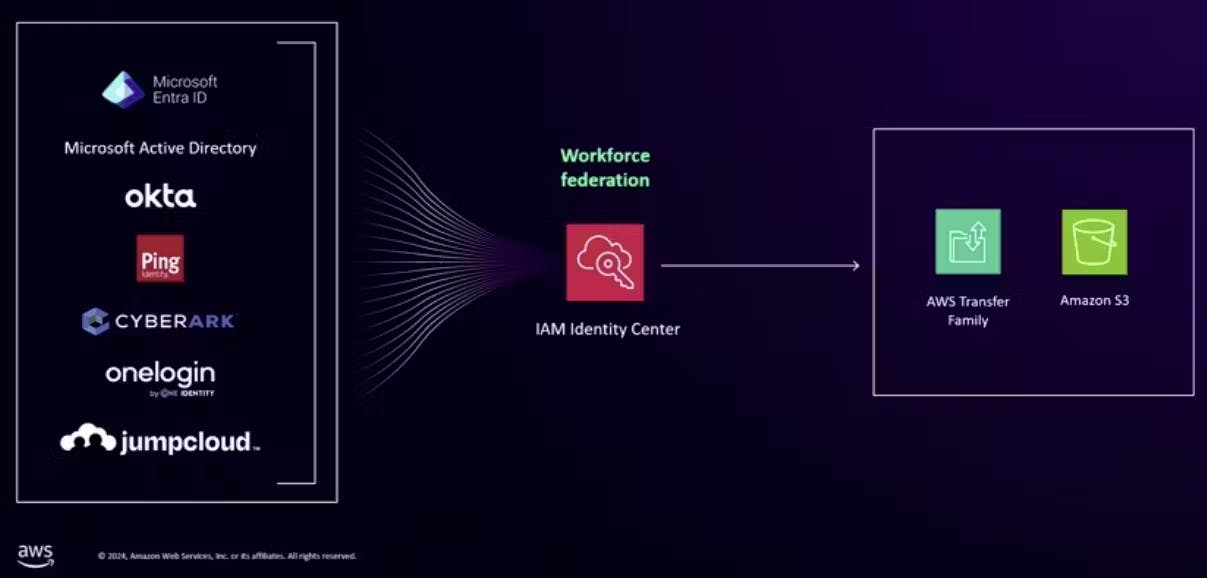
Announced GA in December 2024, this browser-based UI provides:
Direct file access for business users
Integration with corporate SSO via AWS Identity Center
Pricing: $0.50/hour (~$372/month)
Ideal for organisations with mixed technical and non-technical users.
Best Practices
Deploy via IaC (CDK/Terraform)
Use Secrets Manager for user credentials
Enable CloudWatch logging
Restrict access via VPC endpoints
Automate user onboarding and file validation
When to Use This Solution
Secure data exchange with partners
Minimum operational overhead
Event-driven file processing
Compliance-heavy workloads
Pay-as-you-go pricing model
Migration from legacy SFTP infrastructure
Conclusion
By combining AWS Transfer Family, S3, Lambda, and KMS, we built a fully serverless, cost-efficient, and secure SFTP platform that eliminates the need for traditional server management.
This solution delivers:
No infrastructure management
Enterprise-grade security and compliance
Event-driven automation
Predictable, usage-based costs
A modern way to bring legacy SFTP workflows into the serverless cloud era.