


Introduction: The "Bill Shock" of Cloud and AI Within Hyperscalers.
In 2026, we dont just measure AWS Resource costs. Its now a explosion of Generative AI costs and the complexity of multi-account governance. Traditional FinOps can be time costly to investigate all LLMs or even Agent Invocations for costs.
What if you can treat your AWS Billing data not just like a Invoice at the end of the month to a real conversation, and actionable insights? Well we can, with this project the FinOps Agent platform. This Platform uses AWS Services and not limited to AWS Bedrock and Agent Core to turn Manual analysis into a real-time, AI-Driven Dialog and enriched insights.
1. The Architecture: Multi-Agent Collaboration
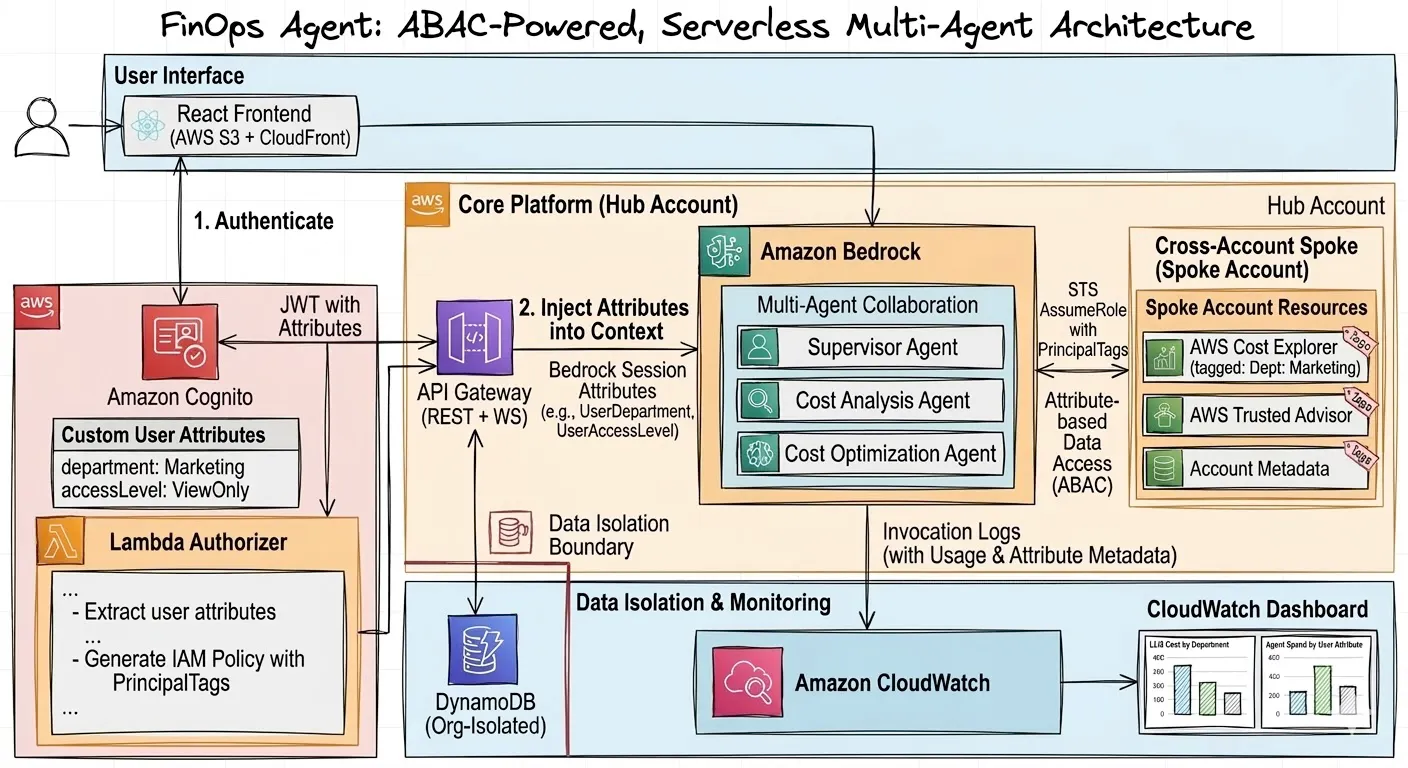
To handle the scale of enterprise billing, we used a Supervisor-Specialist Pattern and A2A (Agent to Agent) A single Prompt isn’t enough; we need specialists.
Supervisor Agent: Uses the Claude 4.6 Sonnet to decompose user Intent.
Cost Analysis Agent: Interfaces with AWS Cost Explorer via Cross-account STS Roles and External ID
Cost Optimization Agent: Scan AWS Trusted Advisor for low-hanging fruit (idle EC2s, unattached EBS).
Hub Account: Designed to house the Agents, Data, User Interface, Amazon Cognito, Amazon CloudWatch, Amazon Bedrock, API Gateway
2. FinOps Agents
The platform doesn't just stop at analysis. It cross-references cost data with Trusted Advisor to surface high-impact savings. Adding in Investigation and Environmental savings based on the type of usage expected in the account. Looking closer to if its a developer sandbox or its a production account.
Prompt: "Are there any idle resources in the Development group we can kill to save money?"
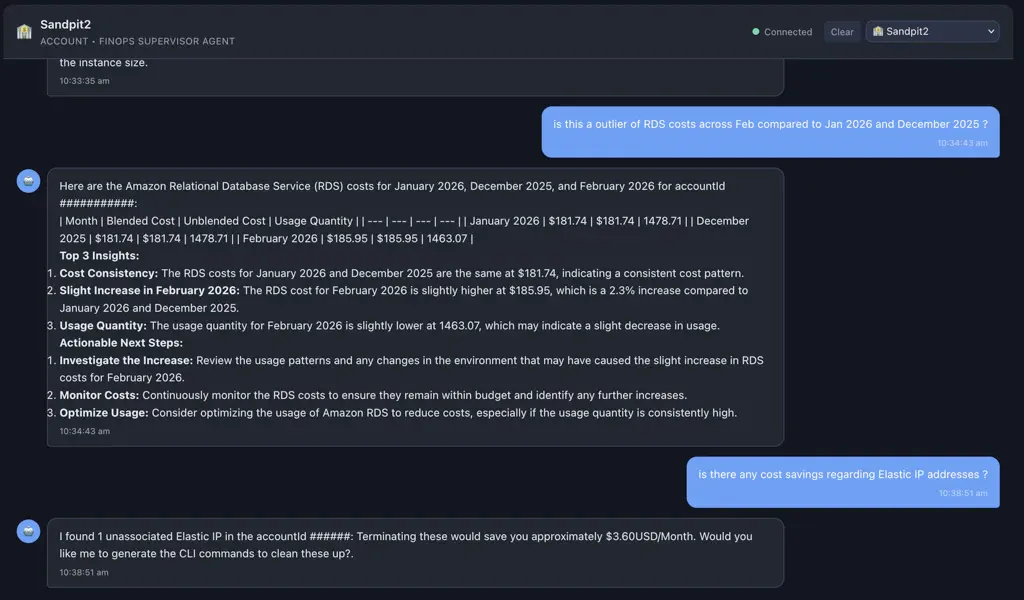
Response: "I found 12 unassociated Elastic IPs and 5 underutilized EC2 instances in the Development group. Terminating these would save you approximately $450/month. Would you like me to generate the CLI commands to clean these up?"
a example below is the FinOps Agent letting us know that its discovered that a EIP is not allocated, It can generate a CLI command to cleanup the orphaned resource.
Unified Cost Visibility
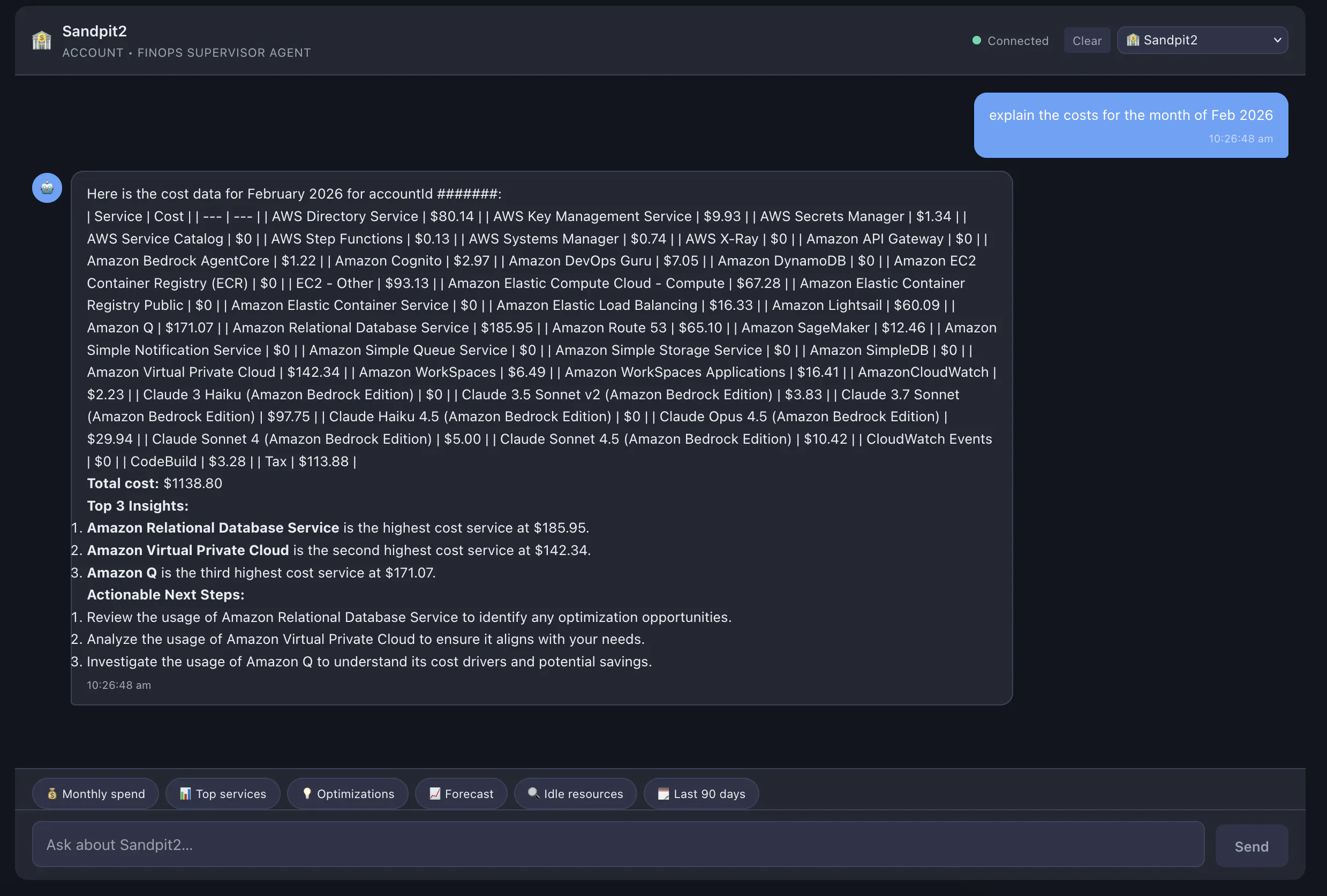
Instead of navigating the complex filters of AWS Cost Explorer, you can query your entire organization (or specific groups) using natural language.
User: "How much did we spend on Lambda across all Production accounts last month, and which account was the highest?"
Agent: "Across your 4 Production accounts, the total Lambda spend for August was $1,240.50. The 'Data-Pipeline-Prod' account (ID: 123456789) was the highest contributor at $840.00, representing a 15% increase from July due to higher invocation volumes in the
us-east-1region."
Unified Cost Visibility
Instead of navigating the complex filters of AWS Cost Explorer, you can query your entire organization (or specific groups) using natural language.
User: "How much did we spend on Lambda across all Production accounts last month, and which account was the highest?"
Agent: "Across your 4 Production accounts, the total Lambda spend for August was $1,240.50. The 'Data-Pipeline-Prod' account (ID: 123456789) was the highest contributor at $840.00, representing a 15% increase from July due to higher invocation volumes in the
us-east-1region."
Forecasting & Anomalies
By leveraging Bedrock’s reasoning, the agent can project future spend based on current trends.
Prompt: "Based on our current growth, what is our projected spend for S3 by the end of the quarter?"
Agent: "Your S3 storage is growing at a rate of 12% MoM. At this pace, your quarterly spend is projected to be $8,200. To mitigate this, I recommend applying the lifecycle policy I found in your 'Logs-Archive' bucket to transition objects older than 90 days to Glacier Instant Retrieval."
We can also extend this to savings around Instance types and migrating to native AWS Instance Types
Prompt: “Based on current ECS/Fargate expenditure can we optimize the current deployment to be more cost effective ?”
Agent: "The Current ECS Deployment is running on larger Instance types there is a cost saving of 21% if we can switch the current deployment to ARM and Amazon Gravaton Instance types"
AG-UI Protocol for Autonomous Insights
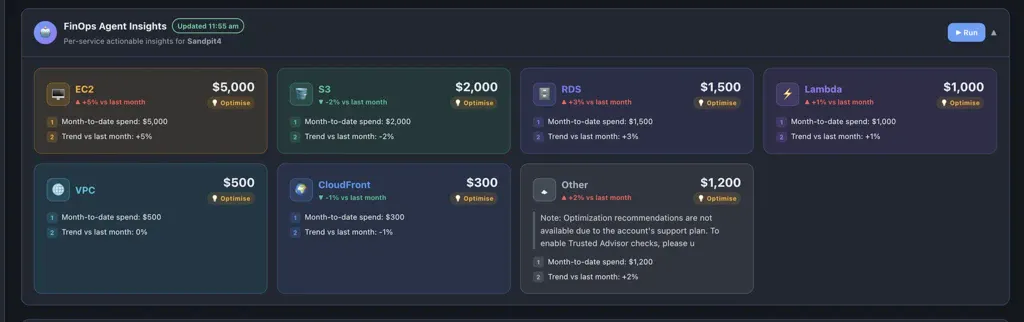
AG-UI represents a paradigm shift from reactive chat to proactive streaming interfaces. By implementing this protocol, the FinOps Agent moves away from the "empty search bar" problem, instead treating the UI as a real-time canvas that assembles itself based on autonomous agent reasoning. It bridges the gap between raw LLM output and structured dashboard by using a "Parser-as-a-Component" strategy: the agent streams standard Markdown, but the UI interprets specific headers as functional triggers to render high-fidelity service tiles, severity badges, and actionable buttons. This allows developers to maintain the flexibility of natural language while providing users with the polished, scannable experience of a traditional SaaS dashboard.
3. Structural Data Isolation: Muti-Tenancy by Design
Security is and was for this project implemented at “Day 0” requirement for the FinOps Project. We wanted project account isolation between users and a accounts team role to see all costs across every account. we used ABAC (Attribute-Based Access Control) and a Three-Tier Isolation.
Identity Tier: Users authenticate via Amazon Cognito, which attaches an OrgId and AccountScope to their JWT.
Authentication Tier: A Lambda authorizer validates the token and Injects these ABAC into the API Gateway request.
Agent Tier: These Attributes are passed as Bedrock Session Attributes. The Agent Prompt is structurally locked to only query data from the accountId or accountIds found in these attributes.
Technical Guardrails:
Following the OWASP Top 10 for LLM Applications 2025 we leverage LLM001:2025 for Prompt injection only allowing IAM Permissions to cross account and the account this project resides in with a pre-validated accountScope
for LLM002:2025 we use AWS Bedrock Guardrails and obfuscation of logging data to CloudWatch.
4. Monitoring the “Watcher”: Tracking Agent & LLM Costs
A FinOps tool that costs more that it saves is a failure, we built in a “Self-FinOps” layer to track its own AI Spend as well as using this for other Agents and LLM costs.
To accomplish this we use the AWS Bedrock Application Inference Profile to track LLM costs, unlike base models, these profiles allow for Cost Allocation Tags.
How it Works:
We route all agent calls through a specific Interface Profile (e.g. arn:aws:bedrock:us-east-1:<accountid>:application-interface-profile/FinOpsAgent-Production
Visibility is captured with a Cost allocation tag
Key: Project, Value: FinOpsAgent. Now in AWS Cost Explorer, we can filter down specifically for the LLM spend of the Agent(s)
Granular Token Analytics
For Department level or even OU Level Expenditure reports, we log the usage directly to CloudWatch logs
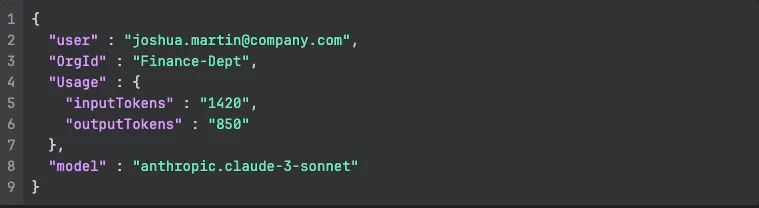
we then use CloudWatch Logs Insights to create a real-time dashboard showing “Cost per OrgId” based on Token consumption.
Cost Considerations & Savings
By Building the Agents and the frontend to a modern serverless stack, the platform “idle cost” is near $0 AUD
Inference
~$3.00 /1M Input Tokens (Measured for Claude 3 Sonnet)
Compute
AWS Lambda (Covered in Free Tier)
Data
DynamoDB On-demand ($0.25 / 1M Read Units)
Storage
S3 (Cloudfront for delivery of the frontend)
Conclusion
The FinOps Agents doesn’t just show a spending Graph across services, it gives you a plan it can tell you, “Hey, you Developer and Sandpit accounts EC2 cost grew, review if a Enterprise SQL License is required for instance(s) i-xxxxxx (Devloper Account) i-xxxxxxx (Sandpit) or it can switch to Developer edition.” or even "Your S3 costs in 'Dev' rose 40% because of versioning; click here to deploy a Lifecycle Policy."
By Combining Multi-Agent Orchestration and A2A, with Strict Data Isolation and Granular LLM Tracking for Cost and Observably, we’ve moved from FinOps Monthly chore to a real-time competitive advantage.